Need help making my website full width (content section) + changing colors (on hover) of mega menu font toggle text

Hi, I am back to making websites again with theme.co and have forgotten completely how to make my website’s content full width - I tried turning off containers in the row settings, I also changed the site width and content width to 100% however it is still showing up in a box with white on either side of the content row sections.

The website is https://bitdrip.io

I would appreciate if support staff could take a look and please give me instructions how to make the site’s content full width

I also have a bonus question related to the mega-menu drop downs I am using - Can you provide me a CSS code to change the color of the text inside of the button - as well as change the color of the text on mouse over (hover) - I searched the forums and tried a few codes you gave other people but they did not work out for my case.

Thank you in advance and ROCK ON THEME CO!
Hey William,

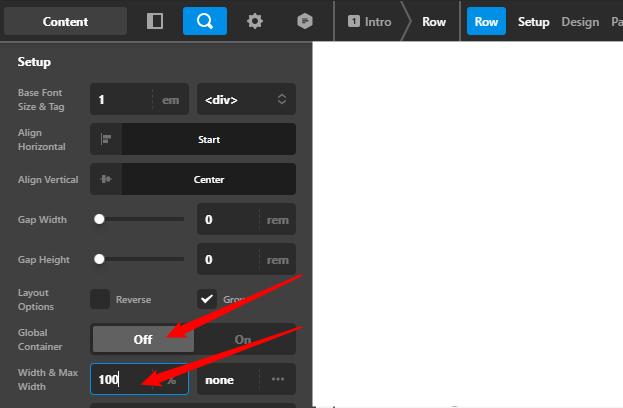
To make the content full width for your case, you need to disable the Global Container of the Row and set the Width to 100%.

image


Regarding the Mega Menu dropdowns, you don’t need custom CSS for that as you can edit the elements in the Dropdown element.

With that said, please check the links below to learn how to edit the Button, Headline, and the Navigation Inline elements which are the elements currently present in your Dropdowns, and also how to edit the Dropdown element itself.

Lastly, custom coding or custom development is beyond the scope of our theme support. It has been in our Terms from the beginning. We post custom CSS help in the past in order to give guidance but we found that it is not sustainable to cater to hundreds of specific customizations every day.

With that said, if you wish to extend the style and functionality of the products we provide through CSS, JS, and/or PHP, you need to learn those languages and then learn how to implement them in Pro.

Hope that helps and thank you for understanding.

Hi thank you for the reply however I tried your fix for the width and it does not work, my site is still showing the white on the right and left of the container. Can you please take another look at my site and help me to fix the width of the site to actually fill up the browser window, Thanks.

Hello William,

I have checked your homepage and I found out that you used the Blank - Container | Header, Footer page template. On this template, there is a container which is why there is still some spacing around the page content. Please edit your homepage and change your page template to Blank - No Container | Header, Footer instead. For more details about the different page templates in the theme, please check this out:

Kindly let us know how it goes.

This topic was automatically closed 10 days after the last reply. New replies are no longer allowed.