Pro - Helo

Hello there,

I am looking to work on my header - basically I want to make my text bigger and centered with my logo, to kill some of the white space OR make my logo sort of bleed over the slider or image on each page to reduce the blank space.

The website is http://theglobalsportsman.com/new/

It appears that I will need to use PRO BUT when I originally purchased the x-theme and upgraded to pro, it messed up the website formating - I am using the “gym” reformatted site, so I reverted back since I couldn’t figure out how to make it work. I hate that I can’t use the pro update. SO I am hoping I can get some help on this!

Thanks so much,
Mo-

or if it is easier, I could just add a line of text above like on our old site at theglobalsportsman.com

Hi Patty,

Thank you for reaching out to us. X header is designed with the ready to go basic settings so we often receive header related customization questions or requests and this was the reason why a header and footer builder was created and an advanced X version was formed now called Pro . Since you already have the Pro license, please consider using Pro so you can build a custom header yourself without custom coding. In case you get stuck with the options or have formatting issues, we’re here to assist all the way.

You can also checkout https://theme.co/docs/converting-from-x-to-pro and https://theme.co/docs/the-difference-between-x-pro

In case you want to continue with X then, you can make the logo bleed by following this thread Logo overlap header

Please note that the code provided in the thread serves as a guide only and is to help you in getting started so implementing it and maintaining the code will be out of our support scope and for further maintenance for new possible versions of the theme that may cause the customization to break, you will need to hire a developer.

If you need any further customization, I’d recommend you to use Pro.

Hope this helps!

Thanks so much for the response. As I said above, I would love to use pro but when I tried upgrade to pro, it messed up the format of my site… is that something you can help me with?

Hi Mo,

Your site should remain the same when you activate Pro from X. In case you will use the custom header from the Header Builder, you will have to recreate the header based on the design that you want. Please note that we cannot provide custom codes for X because that goes beyond the scope of our support.

If you can enable Pro and let us know so that we can look into it.

Thanks!

I have activated pro and just as I said before the website has completely shifted to the left and the top images are all squashed and cut off… please can you help me fix this! Thanks so much

Hi Patty,

Yes, lets fix your PRO installation first, because there is something wrong with it. Im seeing a PRO panel at bottom, that should not be there.

My guess is you rename the pro folder to something else, the folder name should remain pro.

For now please do this.

  • Keep the Cornerstone plugin deactivate, Pro does not need this plugin (only X).
  • CLEAR and deactivate the W3 Total Cache plugin, to make sure the caching plugin is not involve on this issue, remember to CLEAR before deactivating.
  • Delete your current PRO theme, you need to switch to X theme first because you can not delete an active theme.
  • Then Reinstall the PRO. You can download a fresh and clean copy of PRO on your account info page.
  • Then activate the PRO theme.

If done correctly that Pro panel on the dashboard with Cornerstone logo should not be there.

If the issue persists, please provide us FTP credentials in a secure note so we can take a closer look.

Cheers!

Thank you sooooo much!

You’re welcome!

OK so I have managed to get my pro working but I wonder if a header like what is in the attached image is achievable?

I am unable to get the menu in the middle without changing the size of the outside logos…and cant get the text for hunting fishing… to center and get larger! Sorry for all the questions!

Hey Mo,

That’s achievable but you first need to know how Flex works first so you could align stuff inside the elements with Flex options like the Bar, Container, and some elements. With Flex, you can center the text and align the containers equally (provided you’ve set the containers’ width proportionately). You can learn more about Flex here: https://theme.co/docs/use-flex-layout

Elements with Text option do have a Font Size setting. Use the Font Size setting to increase the text’s font size. Learn more here: https://theme.co/docs/text

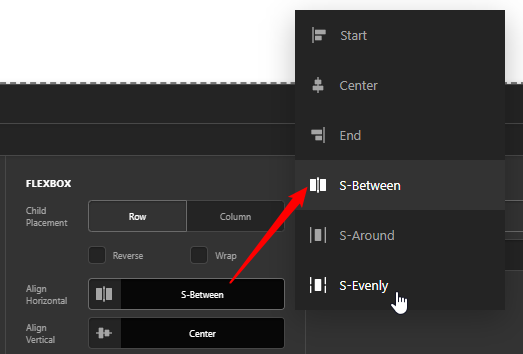
I checked your site and you have a search bar in the header beside your menu. Please remove it if you wish to center the menu. There’s no way or it’s physically impossible to center the menu if the search is there. You must decide what the logos and menu containers’ proportion would be and the Flex options will handle the alignment like setting Align Horizontal of the Bar to Space Between will automatically add space between Containers.

image

image

Hope that helps.

This topic was automatically closed 10 days after the last reply. New replies are no longer allowed.