Hi there,
I want to kindly ask you for an advice. We have an eshop.palimeovocie.sk. How can we put cart icon in the same line with search bar a contact.
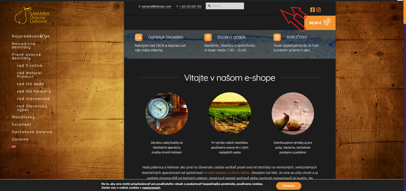
Many Thanks
Michael
Hi there,
I want to kindly ask you for an advice. We have an eshop.palimeovocie.sk. How can we put cart icon in the same line with search bar a contact.
Many Thanks
Michael
Hello Michael,
Thanks for writing to us.
Regretfully there is no option for that at the moment it would require custom development, I would suggest you please contact a developer who can assist you with your concerns, or you can avail Elite where we do custom development.
Alternatively, you can upgrade the X theme to the Pro theme where you would get the Header/Footer builder to create a custom Header as per your design.
Thanks for understanding
Thank you for your reply. I understand.
Is there a way how to fix topbar and the line with cart so it will be still visible on page after scrolling.
Thanks
Hi Michael,
It is not very clear what you are trying to acheive here. If you want to make the Cart section sticky while scrolling, you need to customize the header. And you can create a custom Header using Header Builder which is exclusively available with Pro, not the X you are using. I would suggest you upgrade to the Pro theme to get the Header Builder, please go through the process here: https://theme.co/docs/converting-from-x-to-pro and then go through the following article and video on Header Builder.
https://theme.co/docs/header-builder-overview
And then you can add the following Navigation element for the desktop:
And then you can add the following Navigation elements for smaller screen:
And adjust the Navigation by using the Customize > Hide During Breakpoint option to show/hide in the specific screen size.
Thanks
This topic was automatically closed 10 days after the last reply. New replies are no longer allowed.