Hi
I re-installed my X theme to a different host, changed the url from the member area and then found a free offer of converting my regular X theme to the Pro version - which I accepted. But, what does it mean really?? Because I don’t see the X theme in my Wordpress Dashboard changing to the “Pro” version. Also, I tried to upload your X Pro Child theme, but it doesn’t work. I am a bit confused! What do I do now? Is my X theme going to change to the Pro version automatically and for free? Or is this “Pro conversion” something else and I misunderstood?
Which child theme should I install - the one for the regular X theme or the one for the “Pro” version???
Thanks.
Hey @auritri,
I checked the domain registered to your license and you’re still using X so to answer your questions:
It means you can now convert to Pro. Pro is a WordPress theme with header, footer, layout and content builder. Since Pro already has a Content builder, you don’t need to install Cornerstone anymore. Please check the contents of the links below for more information related to your question.
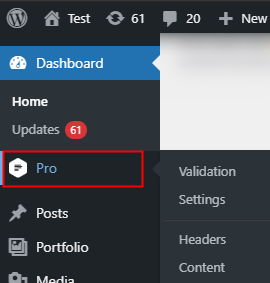
As mentioned above, please convert X to Pro first. You should then see Pro under your WordPress Admin Menu. It’s the same for X, by the way.
You’re still using X Child theme. Download and install the Pro Child theme. You can download here: https://theme.co/docs/child-themes
No, it’s not automatic. If you haven’t done so yet, learn how to convert X to Pro
Download and install the Pro Child theme. You can download here: https://theme.co/docs/child-themes
Hope that helps.
Hi @auritri,
You withdraw your posts and I saw your site is now on PRO. I assume the conversion from X to PRO gone smoothly. If you encountered an issue, please let us know, so we can help.
Cheers,
This topic was automatically closed 10 days after the last reply. New replies are no longer allowed.