HI
I try to set my home page with reovlution slider but not work.
I set blank no container no header , no footer and set my slide on above masthead but still get empty page
site is www.cashnova.it
HI
I try to set my home page with reovlution slider but not work.
I set blank no container no header , no footer and set my slide on above masthead but still get empty page
site is www.cashnova.it
Hi @andamttia,
Thanks for reaching out.
The Masthead option works if the Header is available in the Template. As you have selected the template with No Header, it is not coming up.
So, if you want to show the slider, either you use any template that comes with the Header or add the slider using Classic Revolution Slider elements, or you can use Raw Content to use the Slider shortcodes.
You can get more information on how to use the Revolution Slider in X/Pro here: https://theme.co/docs/revolution-slider#how-revolution-slider-is-used-within-x-or-pro
Thanks
Thanks for your response. I try to use raw component but a cannot set to full screeen how can I do that?
Hi @andamttia,
The slider is within the Raw Content inside a container and the width set as per that container. You can get rid of the container width by setting the Global Container value to Off for the Row element.
You need to set the Slider according to Fullscreen options available, and to set the Slider fullscreen, you need to select slider layout size to Fullscreen, please find the screenshot describing the setting.
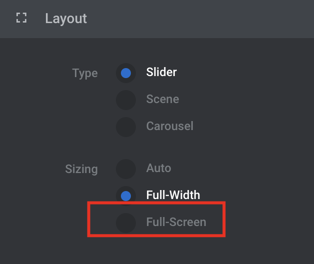
If none of the above helps, please provide login credentials for your site in a secure note to examine it further, including:
– WordPress Site URL & Admin URL
– WordPress Admin username/password
To create a secure note, click the key icon underneath any of your posts.
Thanks
This topic was automatically closed 10 days after the last reply. New replies are no longer allowed.

