Possibility to give client access to text-only adjustments

We often face the need for clients to adjust simple text information on pages we build with Cornerstone.
We always try to avoid allowing the client to edit the Cornerstone pages, as it usually results in layout issues and broken pages.

It would be so cool to have a visual way (probably with permissions) to give the client access to edit only the text of elements (A simple way is sufficient, without considering things like loopers).
Is that something on your roadmap or something that already exists?

I’d be happy also to share our workarounds/knowledge on that.
Hello @TheOwnplay,

Thanks for writing in! The Cornerstone > Settings > Permissions is where you can lock out all elements to certain users like Editors or Authors. You only enable the elements that you want them to have access to. When they edit a page with several elements, they can only inspect the Text element for example and they cannot change anything with the Section, Row or Column settings.

Hope this makes sense.

Thanks @ruenel - This is not true though as in your latest release, even with all the elements unchecked, the editor can still edit the elements of a given page.
I’ve tried it using a user with the editor role while removing all elements from with the Editor permissions under Cornerstone > Settings > Permissions > Editor > Elements, but the editor has still full access to all the element data.
It is true that the user cannot select it anymore from the element list and add a new one, but he can still edit all of the existing settings and even duplicate the element.

Hey @TheOwnplay,

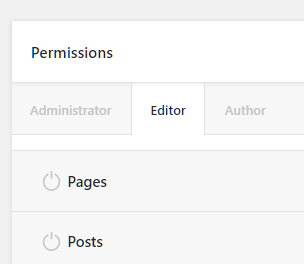
We’re sorry for the confusion. The best method to prevent clients from editing the page is to now allow them to edit in Cornerstone by still going to Cornerstone > Settings > Permissions and turning off Pages or any custom post type.

image

To allow them to edit the text, use ACF Pro and Dynamic Content so they will only deal with ACF Pro’s page custom fields and then the custom field outputs in the page via the Dynamic Content. You can learn how to output ACF Pro custom fields in Cornerstone here: https://www.youtube.com/watch?v=7w7nD6W9tlk&list=PLWPh_GoP7hYWzrfwrzAYL53b8YaQhFhfD&index=7

This topic was automatically closed 10 days after the last reply. New replies are no longer allowed.