Nex Forms JavaScript Conflict

Hello,

We’ve been using Nex Forms with X Pro on this website build for many years now. A recent Pro update is causing a JavaScript error with our Form and the form will not submit.

https://www.dansrockinrate.com/contact/

Nex Forms said the JavaScript error is coming from Pro. How can we fix this?

Thanks,

Micah

This is the support response from Nex Forms.

Basix replied

2 days ago on Saturday at 1:40pm

Hi,

Apologies for the late reply.

There is a 3rd party Javascript error on your site and this is breaking the forms.

3695295454.png

Please ask your theme author to have a look at this issue as its not originating from the NEX-Forms plugins.

Have a nice weekend
Paul

Hello @micahkritzman ,

Thanks for writing to us.

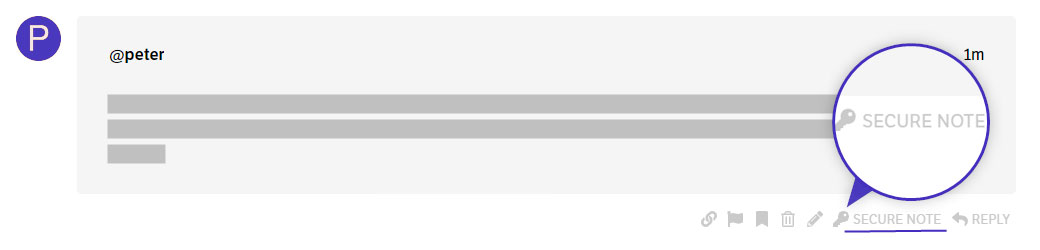
I tried to access the site dashboard, but the given credentials are not working on my end. We haven’t received other reports of this plugin compatibility issue so far. However, since the issue involves a third-party plugin, we cannot guarantee a fix. Please remember that we don’t provide any third-party plugin support it is out of the support scope. I would suggest you troubleshoot the common issues before we investigate your settings. If it doesn’t work for you, please clone your live site to a staging server so that we can debug it without breaking your live website. Please share your staging server details in a secure note. Please provide the following details

  • WordPress Login URL
  • Admin-level username and password

You can find the Secure Note button at the bottom of your posts

Thanks

Credentials now work.

Hey Micah,

I can’t seem to access the site.

Did this happen before the update? Please revert to a backup so the site keeps working.

Thanks,
RueNel

This issue is what the customer originally called me about. X theme will not run. I had deleted the pro folder and uploaded new files and the site started working again. I switched to Twenty Twenty theme to troubleshoot and when I went back to Pro the website crashed again.

I deleted the pro and pro-child folders and got the site back up on Twenty Twenty. I installed Pro and Pro Child newly through the themes tab and the site is back online.

Any assistance with this JavaScript error blocking the form submission will be greatly appreciated.

Thanks,

Micah

Hello Micah,

This is the cause of your issue:

Be advised that the Global JS should only accept JS code. You are not supposed to insert <script type="text/javascript">. Since you already did, just remove the opening and closing tags. Update it and use this instead:

jQuery(document).on('gform_page_loaded', function(event, form_id, current_page){
    jQuery(".js-range-slider").ionRangeSlider();
    });
</script>


<script type="text/javascript">
!function(a){function f(a,b){if(!(a.originalEvent.touches.length>1)){a.preventDefault();var c=a.originalEvent.changedTouches[0],d=document.createEvent("MouseEvents");d.initMouseEvent(b,!0,!0,window,1,c.screenX,c.screenY,c.clientX,c.clientY,!1,!1,!1,!1,0,null),a.target.dispatchEvent(d)}}if(a.support.touch="ontouchend"in document,a.support.touch){var e,b=a.ui.mouse.prototype,c=b._mouseInit,d=b._mouseDestroy;b._touchStart=function(a){var b=this;!e&&b._mouseCapture(a.originalEvent.changedTouches[0])&&(e=!0,b._touchMoved=!1,f(a,"mouseover"),f(a,"mousemove"),f(a,"mousedown"))},b._touchMove=function(a){e&&(this._touchMoved=!0,f(a,"mousemove"))},b._touchEnd=function(a){e&&(f(a,"mouseup"),f(a,"mouseout"),this._touchMoved||f(a,"click"),e=!1)},b._mouseInit=function(){var b=this;b.element.bind({touchstart:a.proxy(b,"_touchStart"),touchmove:a.proxy(b,"_touchMove"),touchend:a.proxy(b,"_touchEnd")}),c.call(b)},b._mouseDestroy=function(){var b=this;b.element.unbind({touchstart:a.proxy(b,"_touchStart"),touchmove:a.proxy(b,"_touchMove"),touchend:a.proxy(b,"_touchEnd")}),d.call(b)}}}(jQuery);

The Global JS output will automatically have the opening and closing script tags.

Kindly let us know how it goes.

Hello and thank you for the help.

Where do I make this change? Is this made in Nex Forms on in Pro?

Micah

Hey Micah,

It’s a custom JS code in your Global JS. I believe you or someone added it on your site. You can learn about the Code Editors available in Cornerstone including the Global JS here https://theme.co/docs/code-editors

Thanks.

Global JS now has this. The form is now submitting.

Thanks for the assistance.

Micah

jQuery(document).on('gform_page_loaded', function(event, form_id, current_page){
jQuery(".js-range-slider").ionRangeSlider();
});


!function(a){function f(a,b){if(!(a.originalEvent.touches.length>1)){a.preventDefault();var c=a.originalEvent.changedTouches[0],d=document.createEvent("MouseEvents");d.initMouseEvent(b,!0,!0,window,1,c.screenX,c.screenY,c.clientX,c.clientY,!1,!1,!1,!1,0,null),a.target.dispatchEvent(d)}}if(a.support.touch="ontouchend"in document,a.support.touch){var e,b=a.ui.mouse.prototype,c=b._mouseInit,d=b._mouseDestroy;b._touchStart=function(a){var b=this;!e&&b._mouseCapture(a.originalEvent.changedTouches[0])&&(e=!0,b._touchMoved=!1,f(a,"mouseover"),f(a,"mousemove"),f(a,"mousedown"))},b._touchMove=function(a){e&&(this._touchMoved=!0,f(a,"mousemove"))},b._touchEnd=function(a){e&&(f(a,"mouseup"),f(a,"mouseout"),this._touchMoved||f(a,"click"),e=!1)},b._mouseInit=function(){var b=this;b.element.bind({touchstart:a.proxy(b,"_touchStart"),touchmove:a.proxy(b,"_touchMove"),touchend:a.proxy(b,"_touchEnd")}),c.call(b)},b._mouseDestroy=function(){var b=this;b.element.unbind({touchstart:a.proxy(b,"_touchStart"),touchmove:a.proxy(b,"_touchMove"),touchend:a.proxy(b,"_touchEnd")}),d.call(b)}}}(jQuery);

You are most welcome, Micah.

This topic was automatically closed 10 days after the last reply. New replies are no longer allowed.