Hi I’m creating a Header with Navbar and logo. There is no element for Logo so I added an image element but how do you position this to the left of the container. Also I’m reading the Header | Themeco Docs it does not guide through how to get there where you have Navbar and logo?
Hi Renato,
Thank you for reaching out to us. The Image element is used for the logo, to create a basic logo and navigation header follow these steps:
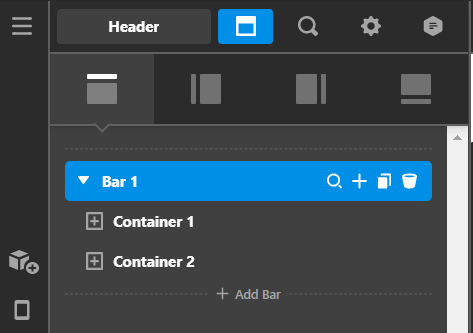
- Add a Bar and inside add 2 Containers (see screenshot)
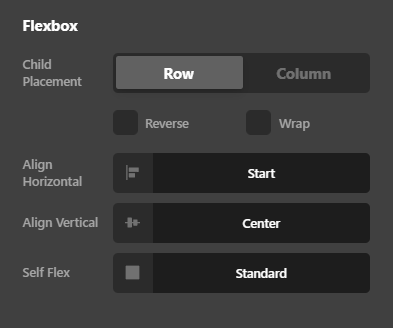
- Inspect first Container and make sure Align Horizontal is set to Start and Self Flex is set to Standard under Flexbox settings (see screenshot)
- Now add Image element in the first container which will be your logo and add Navigation element (preferably Navigation Inline element for desktop screens) in the second container (see screenshot)

As a starting point you can also install any Header Template from our Design Cloud to get started (see https://theme.co/docs/design-cloud)
Hope this helps!
1 Like
Terminology for Flexbox a little confusing for example does Child Placement mean Flex-direction, or Self Flex mean align-self?
Hello Renato,
The “Child Placement” means Flex Direction.
Best Regards.
After installing a Design Cloud template how do I add it to my page?
Hi Renato,
To use the template you downloaded from the Design Cloud, just click the load template on your page then choose the template you downloaded from the design cloud and it will load the template on your page.
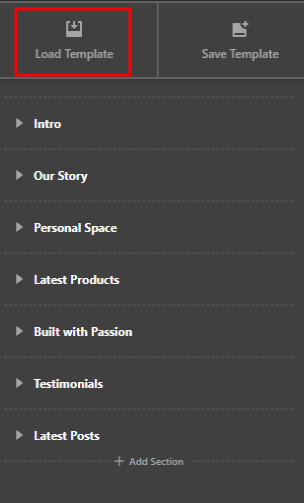
Hope that helps.
Thank you.
This topic was automatically closed 10 days after the last reply. New replies are no longer allowed.