i can not fine way to start install the theme and i bought it for Arabic theme which i can not see and what is pro ? i have one website and i checked on themefoirest before biy and i found demo i need and now i can not find it
Hi Ayman Ragab,
Thanks for reaching out.
To install our theme You need to have a WordPress Installation in your local or webserver
Please check this video to learn more about how to install WordPress https://www.youtube.com/watch?v=digtdXBkGWo
It’s based on active language, if you installed a WordPress with its built-in language (eg. Arabic and similar) then RTL should be automatic without a plugin. Like WordPress installation from here https://ar.wordpress.org/download/.
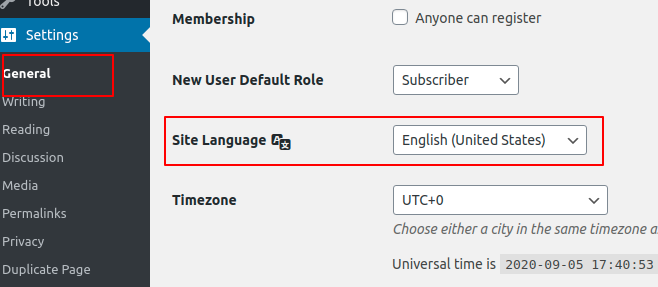
To activate an RTL language (eg. Arabic and similar) go to Settings -> General -> Site Language.
Choose the Language fro here.
Please take a look at the screenshot.
To Install our theme in WordPress please have a look at our documentation
To import the demo, please follow these steps
-
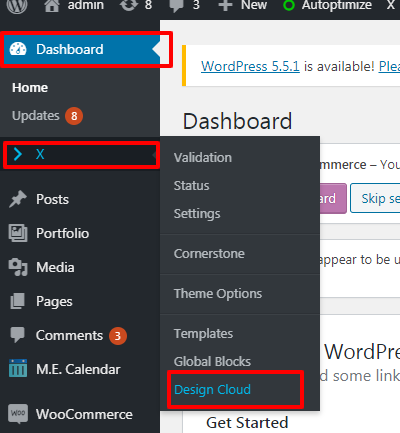
Go to your Dashboard (WP-ADMIN)
-
X—>Design Cloud
Screenshot
-
Select the demo that you like then click on the “Install” button

Pro is also our theme you can check its feature here https://theme.co/docs/the-difference-between-x-pro
Hope it helps you.
Thanks
This topic was automatically closed 10 days after the last reply. New replies are no longer allowed.