Hello I saw a header / menu structure on another site and was wondering if I could replicate it using Xthemes.
Bellow is an imaging showing what I would like to recreate:

Thanks
Hello I saw a header / menu structure on another site and was wondering if I could replicate it using Xthemes.
Bellow is an imaging showing what I would like to recreate:
Thanks
Hi Gavin,
Thank you for reaching out to us. Please note X header was not designed to accommodate extra elements in the header so we often receive header related customization questions or requests and this was the reason why a header and footer builder was created and an advanced X version was formed now called Pro. Please consider upgrading to Pro so you can build a custom header yourself without custom coding. In case you upgrade to Pro and you get stuck with the options, we’re here to assist all the way. You can also checkout https://theme.co/docs/converting-from-x-to-pro and https://theme.co/docs/the-difference-between-x-pro
Using X, there are different ways to add additional elements e.g In your screenshot, I see there is a contact information and an extra button. In X you can enable the Topbar via X > Theme Options > Header > Miscellaneous > Topbar and add the contact information in the Topbar content
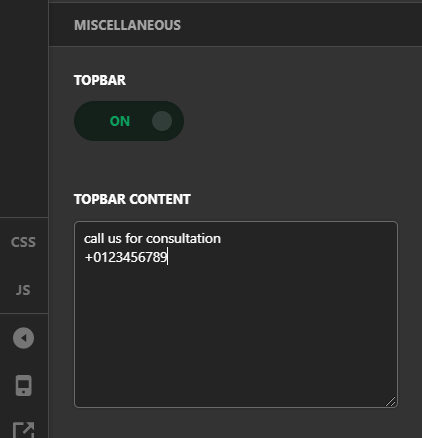
Now for the additional button, this can be done by adding a custom link (see https://easywpguide.com/wordpress-manual/appearance/updating-the-menu/adding-a-custom-link-menu-item/) in your navigation menu and then style it using custom CSS.
For the custom CSS, here are some related links for further reading, this could help you in finding and implementing some CSS fixes:
Hope this helps!
This topic was automatically closed 10 days after the last reply. New replies are no longer allowed.