Ethos Social Icons in Header and Footer Not Changing Size

I’m currently trying to increase the size of the Ethos social icons within the header and footer. I’ve been through all of the following support entries and none of them seem to have any impact.


Currently, on my site (http://courageouscaterpillar.com/) I’m trying to use CSS like the following which is not working:

.x-social-global a {
    font-size: 25px !important;
}

Any guidance would be greatly appreciated!
Thanks.
Hi There,

That is the correct CSS and it should work on both header and footer social icons. See this: https://screencast-o-matic.com/watch/cbXbee2rZC

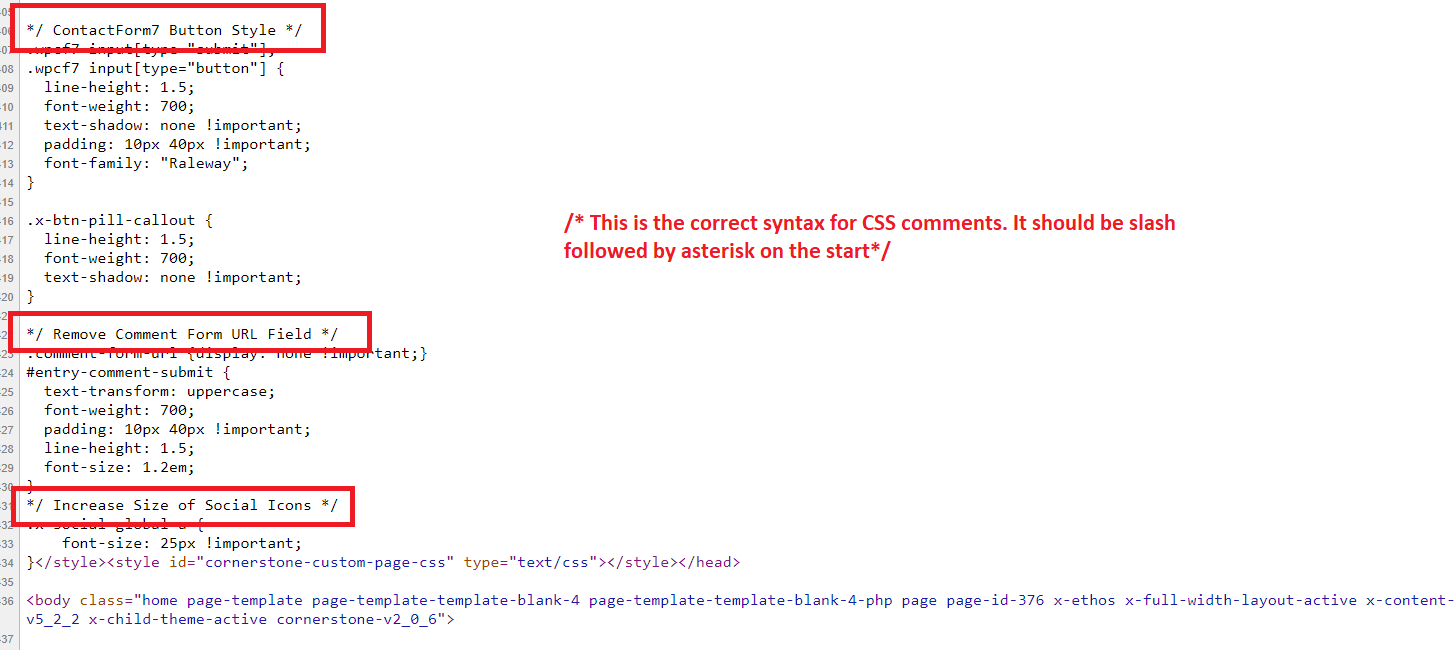
Either CSS syntax error or cache might prevent this from working. I have check your custom CSS and found that you are using incorrect syntax for CSS comments.

Hope this helps.

1 Like

Doh!! Thank you for the correction! :slight_smile:

You’re more than welcome, glad we could help. :slight_smile:

Have a great weekend,
Cheers!

This topic was automatically closed 10 days after the last reply. New replies are no longer allowed.