Different header colours for different pages

Hello

A while ago you guys helped me with setting a colour to my header with the following code:

.x-navbar {
background-color: #141C32;
}

I am now wondering if it’s possible to have different colours of the header on different sub websites. So, I would like to have the current one in blue but lets say have contact page in white.

I essentially want to combine three websites in one, so each section would have to have different logo, background colours and different link colours. Is that doable?

Many Thanks
Jack
Hello Jack,

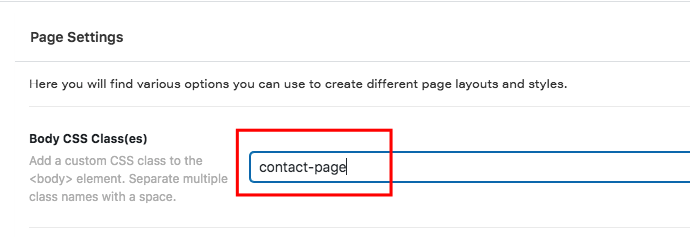
Thanks for writing in! What you have in mind can be accomplish be editing the page, for example your contact page, and add a Body CSS Class in the page settings.

For example in your contact page, you add contact-page in the body class;
gt3t1JyrT0WfH04_X601Qg

If you are editing in Cornerstone/Pro Editor, click the gear icon to find the Page Meta settings.

And then you can use this class to make sure that the custom CSS will only take effect on the contact page. Therefore the custom CSS will become:

.contact-page .x-navbar {
  background-color: white;
}

Hope this helps. Please let us know how it goes.

Thanks Ruenel, that’s great. I will try it tomorrow.

Can the same body css class trick can be used to change the colours of the links in the menu and the logo? If so, what would be the code for that?

Many Thanks
Jack

Hey Jack,

Yes, the same method can be used for the menu and logo. Showing you what code to use however is beyond the scope of our theme support. Ruenel forgot to mention that the code he provided is only a guide. We can’t provide custom codes as part of our regular theme support because if that is the case, we will be flooded with website customization requests.

What you can do instead is to learn CSS and also learn how to use the browser’s element inspector. Once you become an expert using those, you can customize the appearance of any website.

If you don’t want to learn CSS, I’d recommend you upgrade to our Pro theme so you’ll have the ability to create a custom header and assign a header to specific pages.

Hope that helps and thank you for understanding.

This topic was automatically closed 10 days after the last reply. New replies are no longer allowed.