Church theme errors

Hello,

When I try to save global settings such as colors or upload custom fonts it is not working. I am just getting an error saying “try again later” with no further explanation.

Also I have created an envira gallery however when I try to add Classic Envira Gallery it does not appear in the drop down menu for the widget (The option just says no galleries available) and it does not render either in cornerstone or on the actual site…

Also is it possible to change the background color of the header and all other areas on the pages which are rendered white by default to another primary colour easily?

Thanks
Hey Stephen,

For the global settings and Envira Gallery issues, if you haven’t done so yet, please first do the following basic troubleshooting steps.

  1. Testing For Plugin Conflict
  2. Theme Update
  3. Child Theme
  4. Css/Js Customization
  5. Increasing Php Memory Limit
  6. Version Compatibility

Regarding the header background color, I see you have both the X and Pro themes and there’s no option to change the background color for the header. If you’re using Pro, you need to build your desired header design. To have an idea how to build a header, please watch the Pro Header videos in our Youtube Channel

Hope that helps.

Okay that’s fine I have gotten it working now.

Also 2 other points -

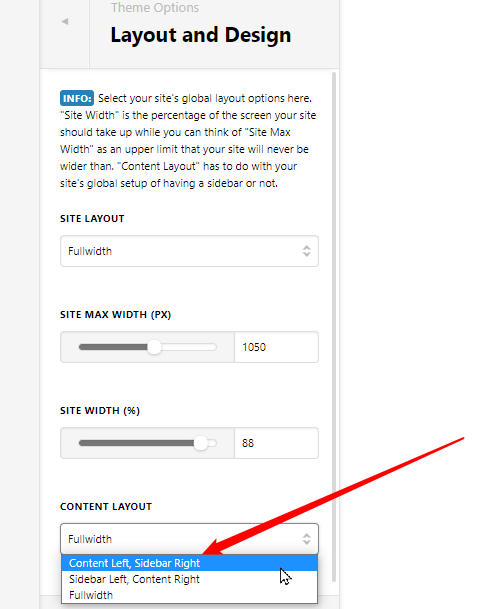
When I create a new page it for some reason is defaulting to having a right sidebar even if I select the full width layout for the section and the global option is set to full width. Any ideas how to fix this?

Also is it possible for me to set an image (full width) as being the background for new pages and have the content area ‘floating’ above them? It seems to only let me set background colours for sections not images…

Thanks again!

Hey Stephen,

The default page template will have a sidebar if your Content Layout uses a sidebar. Please check your Content Layout setting.

If you want the Content Layout to remain, please use a Blank Page Template. You can learn more about Page Templates here https://theme.co/docs/page-settings#page-attributes


The Section and other structural elements does have an image background option if the Advanced Mode option is enabled. Please see the Advanced Mode documentation here https://theme.co/docs/advanced-mode

I’m not sure what exactly you’d like to achieve when you say floating but you can set a page background. See https://theme.co/docs/page-settings#common-page-settings

Hope that helps.

My bad sorry - I was just looking at the site layout option thanks

No worries, Stephen.

This topic was automatically closed 10 days after the last reply. New replies are no longer allowed.