Hey Karl,
Just based on personal experience, conversion tracking is not done in the form but rather in the thank you page. That means you add the tracking script in the thank you page. You can add it using the Raw element.
What You Do iN THE FORM
In the Redirect Action’s Location field, build your Thank You page URL with query parameters using {{dc:form:data key="..."}} tags. For example, if your form has fields named email, first_name, and last_name:
/thank-you/?email={{dc:form:data key="email"}}&name={{dc:form:data key="first_name"}}
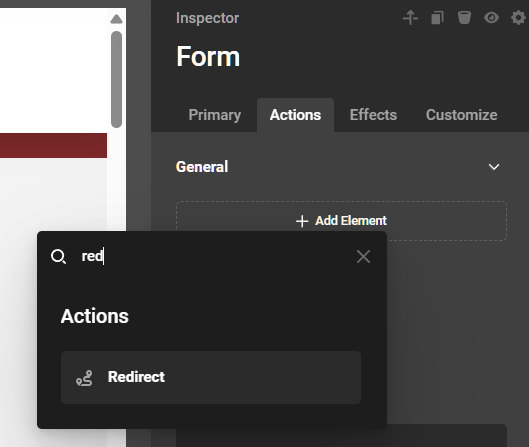
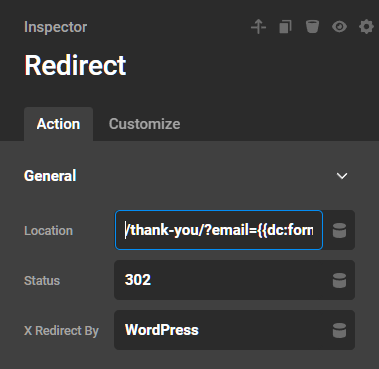
/thank-you/[email protected]&name=John
Before reading the details below, please note that we are not conversion tracking experts and this is beyond the scope of our product support. This only serves as a guide. Thist might be incorrect so take this with a grain of salt.
Connecting It to Google Ads Conversion Tracking
Once the data is in the URL, on your Thank You page you can read it with JavaScript and pass it along to Google Ads:
<script>
  const params = new URLSearchParams(window.location.search);
  const email = params.get('email');

  gtag('event', 'conversion', {
    'send_to': 'AW-XXXXXXXXX/YYYYYYYYYYY',
    'email': email  // can be used for enhanced conversions
  });
</script>
This is particularly useful for Google Ads Enhanced Conversions, which can use the submitted email address to improve match rates.
One Caveat: URL-encode special characters
Dynamic Content values are inserted as-is, so if a user types [email protected] in an email field, the + could be misinterpreted. If you’re using a PHP snippet (via Advanced Mode) or a custom action, you could urlencode() the values. Otherwise, for basic fields like names and emails it generally works fine.
Hope that helps.

