Hi, there used to be a way to assign saved presets as element defaults. I can’t figure out how to do that since the Pro update… I have saved a Heading element preset, and I would like to make it the default for all future Heading elements. Thanks!
Hello, @adaptifyDesigns,
Thanks for writing to us.
In case if you talking about how to use the preset template please have a look at our doc to learn more how to use export/import templates.
If I have missed anything please share a marking screenshot so that we can help you properly.
Thanks
I’ve read the docs, and they are outdated. The instructions about the Element Defaults shows screenshots of a “template manager” section, but in the latest Pro theme I can’t find that link while in Cornerstone. The template manager allowed me to assign a Preset as the default for that particular element, so that whenever that particular element was added to a page, it would automatically have the selected preset applied to it. I can’t figure out how to do this anymore.
Thanks for your help.
Hey @adaptifyDesigns,
The Element Defaults have now been replaced with “draggable presets” which you can save as a favorite if you’ll use it frequently.
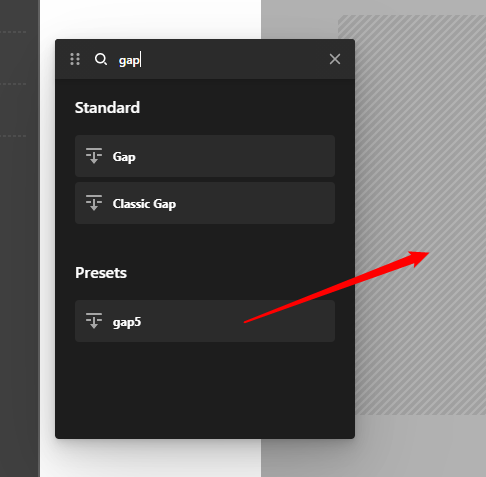
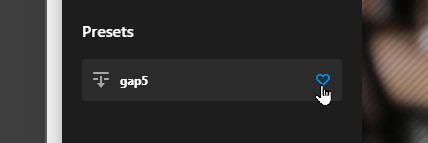
Hope that helps.
Ok, got it. Thank you.
This topic was automatically closed 10 days after the last reply. New replies are no longer allowed.