Tagged: x
-
AuthorPosts
-
December 19, 2016 at 4:39 am #1297963
 ChristopherModerator
Hi there,
Please change background color under Customize -> Layout and design.
Please add following code in Customize -> Custom -> Global CSS :.entry-wrap { box-shadow: none; }To learn more about cornerstone, check this page : https://community.theme.co/kb/
Hope it helps.
December 22, 2016 at 11:21 pm #1302475 JasonParticipant
Anyone there
December 22, 2016 at 11:22 pm #1302477JasonParticipantIn the Sydney theme by aThemes, there are many widgets(eg Call to Action etc) . I have installed the theme on my site but not activated it. Will the widgets apply to my X theme? If not, can anything be done about this?.
December 23, 2016 at 2:29 am #1302556FriechModeratorHi There,
I’m afraid that is not possible. X|theme/Cornerstone has its own Call to Action element, actually two elements the Callout element and the Creative CTA element.
You need to install the Cornerstone because that is require to run X. Just navigate to Addons panel and X|Theme will automatically install the Cornerstone for you.
This page
https://athemes.com/can easily be done with Cornerstone if you get the wind of it, watch the video below as introduction.To change the page background-color, on your admin dashboard navigate to Appearance > Customize, on Customizer under the Layout and Design panel look for the Background Color option and change that to to your desired color.
Thanks.
December 23, 2016 at 10:14 pm #1303345JasonParticipantThanks. It’s just that Cornerstone is quite hard to use especially for a novice like me. I tried using the video article but as y’all are using Vimeo , it takes a really long time to load. Use YouTube .
Will Cornerstone be able to create a site like Wp Explorer. In the attachment below there is an image from Wp Explorer. There are many icons. Will I be able to create those similar icons using Cornerstone???
December 23, 2016 at 11:01 pm #1303358FriechModeratorHi There,
Anything that we don’t understand is quite hard to use. Cornerstone is a very novice friendly builder. The link I provide you above is a YouTube video (X Theme: Intro to Cornerstone) its a good head start to those starting to learn Cornerstone.
You mean this icons?

This are standard fontAwesome icons, Cornerstone have that.

Thanks.
December 24, 2016 at 1:11 am #1303412JasonParticipantThanks a lot
December 24, 2016 at 1:19 am #1303417ChristopherModeratorYou’re welcome.
December 24, 2016 at 11:52 am #1303598JasonParticipantBy the way. Where is the icon area in Cornerstone? Thanks
December 25, 2016 at 1:11 am #1303803JasonParticipantThese icons. How do i navigate to them??
December 25, 2016 at 1:57 am #1303820ChristopherModeratorHi there,
Please search for ‘Icon’ element in elements tab, see :
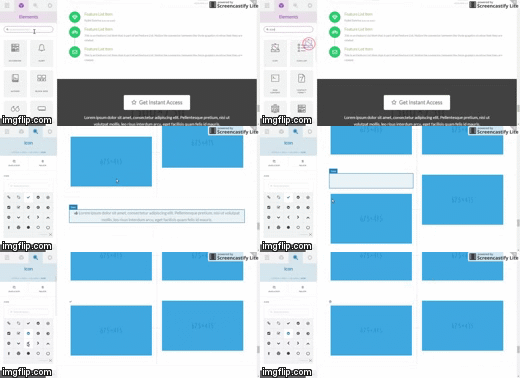
Hope it helps.
December 26, 2016 at 12:49 am #1304339JasonParticipantThanks a lot. Do y’all have an affiliate program or something like that??
December 26, 2016 at 1:00 am #1304343Paul RModeratorHi,
You can use the Envato affiliate program since all sales are handled by Envato – http://themeforest.net/affiliate_program
Thanks
December 26, 2016 at 6:20 am #1304487JasonParticipantI use the Integrity stack for my site. Noe according to my screen shot, i want the navigation bar to be as two buttons(as shown in the screenshot). How can that be accomplished?
December 26, 2016 at 6:33 am #1304493ThaiModeratorHi Jason,
It’s possible by custom CSS.
Would you mind adding those menu items to your navbar?
Thanks.
-
AuthorPosts
- <script> jQuery(function($){ $("#no-reply-1236597 .bbp-template-notice, .bbp-no-topic .bbp-template-notice").removeClass('bbp-template-notice'); }); </script>
