Hi,
It appears this thread has been closed without communicating the solution.
Best regards.
Hi,
It appears this thread has been closed without communicating the solution.
Best regards.
Hi @shimoda,
Thanks for reaching out.
A thread without a reply within 10 days will automatically close.
The cause of the issue is still the Translation Manager. You can see the page itself is still under that translation feature
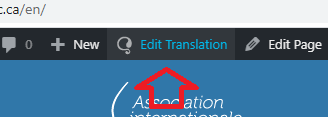
That’s why changes made in the builder doesn’t take effect at all. Clicking that will then display this pop-up saying that you shouldn’t edit it outside the translation manager
So I went ahead and turn on classic translation as shown below under WPML setting
Then I edited your English homepage in the admin clicking Modifier quand meme button and I disable the translation
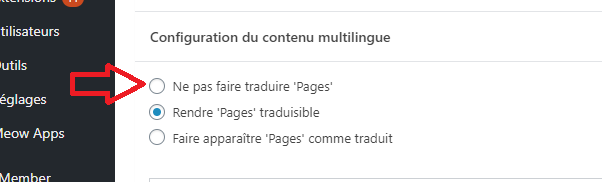
The problem is, it revert back to Rendre 'Pages' traduisible if you reload the page/edit. Seems to be cache or similar. You can try changing that setting to confirm it, just make sure to wait 1 minute before reloading the page, it will revert back to Rendre 'Pages' traduisible.
You can also try this, try editing the English page of your home page within the builder. Then add a new element just below the last text element such as this
and the actual page will remain as is
This further confirm that the translation editor is permanently overriding the actual content of the builder, since the setting above won’t change or disable the translation. And it’s something we can’t fix on our end since the builder is simply outputting the content but overridden by translation editor. I recommend contacting WPML author to see what other options you have to permanently disable the translation editor/manager. It’s not really turning off no matter what I tried, at least on your site as it works flawlessly on my installation.
And for that, I also recommend creating a staging copy of your site as this seems similar to previous issues in which caused by the host environment itself like the settings and data are reverting back after reload. Then test if the issue is still present there if it’s not then the issue is your current site’s host environment.
Thanks!
This topic was automatically closed 10 days after the last reply. New replies are no longer allowed.


