WPML - Changes appear inside cornerstone but not on live site

Hello,
I have a very simple site that’s only three pages. When I edit the Heading it appears correctly but after it’s saved and viewed the headline is back to English. I’ve tried replacing the elements (Headline, text with H1 tag, H1 within the text of the paragraph below. Nothing works.

I’ve disabled all caching plugins and cleared cache at the server level. I’ve also used private browsers and other devices. Please help - I was hoping this was going to be a simple change.

WP: 5.4.2
Cornerstone: Version 4.2.3
x: 7.1.2
WPML Multilingual CMS: Version 4.3.16
WPM Translation Manager: Version 2.9.9

I’ve read the other threads but I don’t see any clear response to this situation.
Thank you very much for your assistance.

EDIT: When I duplicate the text field the first one is in english and the second in spanish.


Hi Kerri,

It’s due to string translation of the home page, please check this screenshot

And that translation overrides the output generated from cornerstone.

Please do these

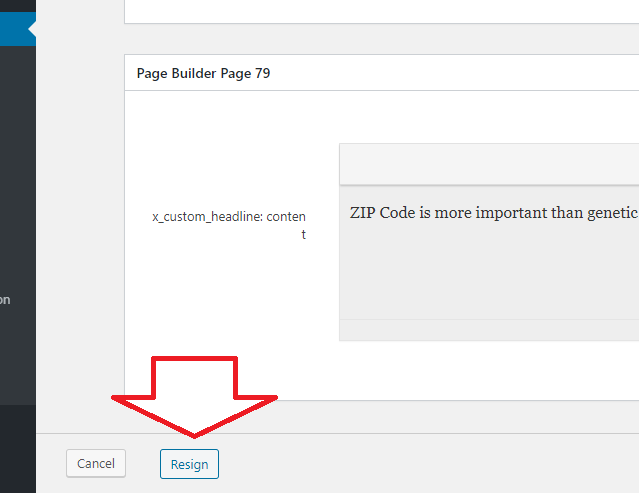
  1. Go to Admin > Pages, and edit your home page’s spanish translation

then click the button resign to remove it

image

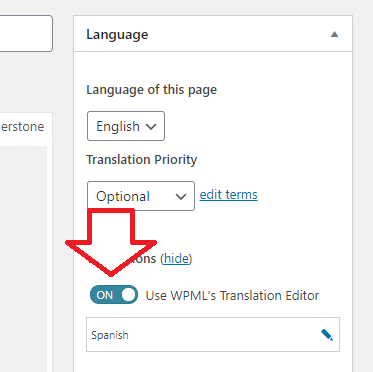
2). Please edit both your home page in Admin > Pages and turn off WPML Translator editor

image

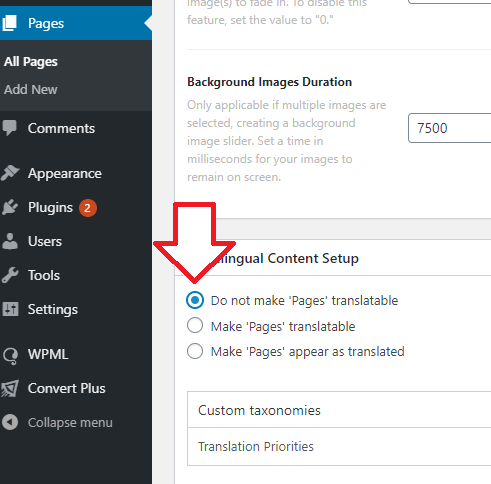
  1. Now edit both your English and Spanish home page in Admin > Pages and make them non-translatable.

image

This process not necessarily remove the translation capability, it’s just that, it will allow cornerstone to serve its own content that user manually translated. And any page or post created in cornerstone must be translated manually, and within the builder and not to any translation editor.

Thanks!

Hi Rad,
Wow, these are excellent directions! I believe I followed them exactly and updated both pages, but I’m still seeing the heading in on the Spanish page in English. I’m adding the content in Cornerstone, correct?

With such great instructions I feel like an idiot for getting something wrong :upside_down_face:

Thanks so much for your prompt response.

Hello Kerri,

You will have to do your translations within Cornerstone.
You may need to review this translation documentation:

Hope this helps.

Hi Ruenel,
Unfortunately, it doesn’t. I have manually translated the site and it’s that single block that doesn’t display correctly on the life site. I’ve tried adding the translated copy into different types pf blocks (text, headline, classic etc) but the top text element never translates.

Rads response was so detailed it was easy to follow. I don’t understand why it’s not working. It’s in a staging environment so you are welcome to try it out.

Update
The css editor inside the cornerstone page is not yielding any results either.
I looked in the text editor for the home page and there is the text in there “ZIP Code is more important than genetic code.” that cannot be removed. I think that’s what’s wrong but the CSS isn’t making changes either. please help.

Hi Kerri,

It seems to be due to cache, the page now displays the correct content/transalation. And about the CSS, it’s added like this

.h-resp-main > span {ntdisplay: block;n}

It will not work due to n, please change it to this

.h-resp-main > span {display: block;}

Hope this helps.

Hi Rad,
I actually just completely rebuilt the page using a clean page after following your directions on how to set up WPML. the page displayed correctly after that. I think having a simple WPML set up process for Cornerstone would be helpful in the future. Thanks so much for your assistance.

@k3441,

We are glad were able to help you.

Thank you.

This topic was automatically closed 10 days after the last reply. New replies are no longer allowed.