Woocommerce Layout builder products on homepage

Hi!

I really love the new Pro update! I created a new layout to show the woocommerce products on the shop page, but I also want to show the newest products on my homepage with the same layout created on the shop page.

The original woocommerce shortcode and the related products element shows the original theme layout.

Is it possible to use the layout designed myself?

Site is still under construction (and in dutch) but available here.

Thanks in advance!
Michael
Is it also possible to increase the default products displayed on the shop page? Default is 9, but the global woocommerce theme settings doesn’t seem to change the amount of products on the shop page created with the layout builder.

Thanks!

Hello Michael,

Thanks for writing in! The layout builder can be used to create custom layouts for your shop index, product archives, and single product page. If you want to display the same shop index layout on your homepage, you will need to save your shop index layout as a template. You can then edit your homepage and load the shop index template so that the recent product items will display on your homepage with the same styling as your homepage. To know how you can save a layout as a template, kindly check this out:

Hope this makes sense.

Hi!

Thanks for your reply! I tried to use the template, but only one product gets displayed. I can copy the products, but then all the products are the same (of course).

I want it to only show the newest products on the homepage, like you can with this woocomerce shortcode, but then with the styling created in the layout builder.
[products limit="6" columns="3" orderby="date" class="latest-products"]

I really hope it’s possible…

Many thanks!
Michael

Hello Michael,

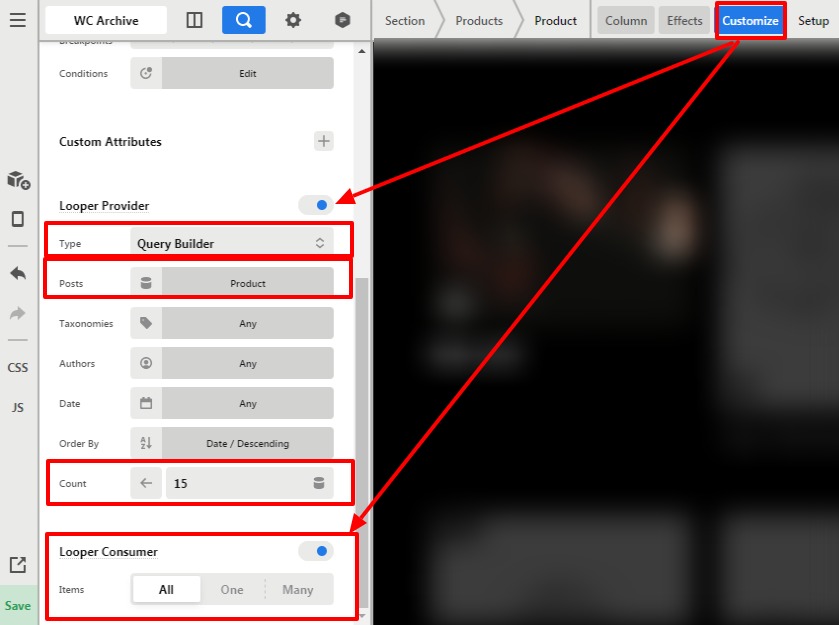
To display recent product, go to your Layout builder where you have saved the Product Archive layout —>Porducts—>Product—>Customize.

  1. click on the Looper Provider
  2. Set the Type as “Query Builder”
    3.Set Post as “Product”
  3. Count as per your design
  4. Set order Date/Descending

Now go to Looper consumer
Items —>Set as ALL
Please have a look at the given screenshot below.

Thanks

1 Like

That’s exactly what I meant, I’m loving this theme even more!

Thank you, really appreciate it!

Hello Michael,

Thanks for your appreciation, it helps us to serve you better. Glad that we were able to help you.

Have a great day!
Thanks

This topic was automatically closed 10 days after the last reply. New replies are no longer allowed.