WooCommerce Issues with Ethos

Just installed WooCommerce and added my products. On the SHOP page, I do not have the option to have a sidebar and can’t figure out how to add one. I have a screen shot of the options for the layout for the SHOP page. I want it to look at least like the demo for Ethos with woocommerce with the products categories on the sidebar (https://demo.theme.co/shop-ethos/product-category/posters/). Can you help?

I am running:
X Version: 7.2.1
WooCommerce Version: 3.9.3
Cornerstone 4.2.1

Thanks!

Hi @shannonrenner,

Thank you for the screenshot.
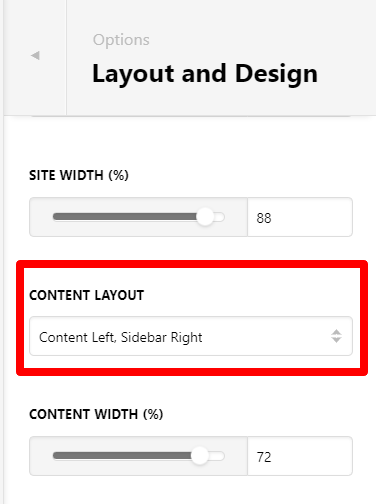
Please set the following settings on Theme Options > Layout and Design:

Then on the SHOP LAYOUT settings that you have shared, please choose USE GLOBAL CONTENT LAYOUT so it will inherit the sidebar.

See this documentation to understand layout better.

Hope this helps.

Thanks! So helpful!

I put the nav menu in the MAIN SIDEBAR widget, but it doesn’t show up. Also, the products are all squished in the center of the page…https://www.collectivedg.com/shop/. Can’t figure out either. Can you advise?

The nav menu shows up now…but the layout is still very narrow. https://www.collectivedg.com/shop/?preview_id=17706&preview_nonce=2380268b26&_thumbnail_id=-1&preview=true

Hi @shannonrenner,

I’m sorry but I am not entirely certain what is the issue on this page.


There is a product category menu on the sidebar is that the menu that you’re looking for?

And your products are not squished, that is how a 3 columns layout looks. Please navigate to Theme Options > WooCommerce > Shop Columns if you need to change the number of columns.

We cant view that page, please provide us login credentials in a secure note.

Thanks,

This topic was automatically closed 10 days after the last reply. New replies are no longer allowed.