Just one of those things that has been bugging me forever.
Perhaps I am just missing something but I can’t seem to figure out a consistent way to create the shop archive.
What I don’t understand is why the shop layout doesn’t follow on from the
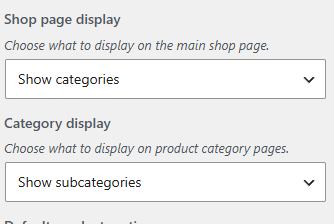
Appearance - Customize - WooCommerce - Product Catalog settings.

If we want to create a shop page that shows top level categories, and only shows sub categories on the category pages the layouts should follow what is set here so that the primary loop contains the categories as set here. I don’t understand why I need to create a provider in these instances.
The only way I’ve every managed to get this to work is with custom loopers. In the end almost all of my shops never use this structure simply because of how difficult it seems to be to set up.
Is there any way you can get the shop layout loop to work with these settings or set up an easy way to get this format without resorting to custom loopers.
Hopefully I’m simply having one of those moments and there is an easy way to do this.
Seems like this should be much easier.