White Space Appears Next to Full Screen Image

Hello,

I need assistance with a website I’m designing:

https://tiedustwo.org

On the About Us, Resources, and Contact page when you first go to the webpage a white box appears to the left of what should be a full screen image. As you scroll, the image takes up the screen. I would like for the white box not to show. I’ve included screenshots for your reference. Can you please assist?

Thank you,

Brittani

Hello Brittani,

Thanks for writing in!

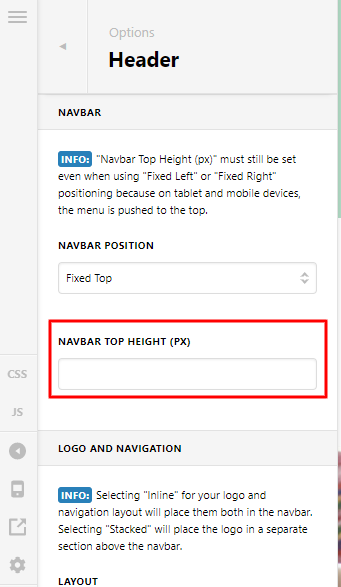
You are experiencing this issue because of your Navbar Top Height setting. Please go to X > Theme Options > Header > Navbar and change the “Navbar Top Height” from 90 to 220 pixels. This should resolve your issue why there is a white background and the section is moving from left to right as you scroll the page.

If this is not helping, provide us access to your site so that we can check your settings. Please create a secure note with the following info:
– Link to your site
– WordPress Admin username / password

To know how to create a secure note, please check this out: https://theme.co/docs/getting-support

Regards.

This topic was automatically closed 10 days after the last reply. New replies are no longer allowed.

Hi @BeeDesigns,

I just remove the height you set in your X > Theme Options > Header > Navbar

And it somehow fix your issue in the banner section of your about page.

Hope that helps.

Thank you.