Hey @mglyn,
Thank you for the details, and for letting us know you have already watched the Archive Templates video. I understand you would like to add a list of your posts to your new Archive layout that matches your earlier Ethos design: the featured image on the left, and the post title with a short excerpt on the right. Please follow the steps below.
-
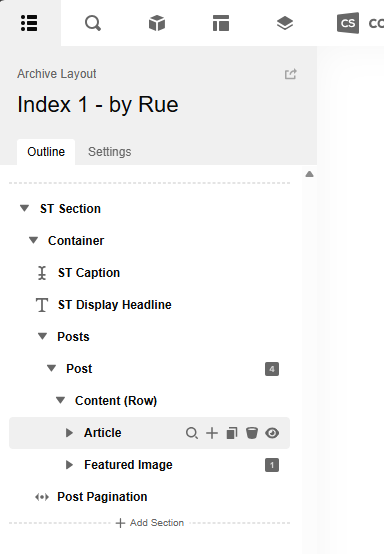
Add a ready-made Posts element – Open your Archive layout in Cornerstone and open the Elements library (the plus icon “+” in the builder’s left toolbar). Type “Posts” in the search box. Cornerstone includes several ready-made Posts elements: Minimal, List, Tiles and Magazine. Drag Posts (List) into a Column on your layout. This design places the featured image on the left and the post title on the right, which is the closest match to your Ethos layout. Click Save.
-
Add the excerpt under each title – In the Layers pane, expand the Posts element you just added and find the Article section that holds the post title. Drag a Text element into it, below the title, and type
{{dc:post:excerpt}}as its content. Each post will now show the first part of its text under the title. The List design is made for narrow spaces, so if the layout looks too narrow, select the outer Posts element and increase its Max Width. -
Set the order of your series – Select the outer Posts element and open its Looper Provider settings. Change the type to Query Builder, set the post type to Post, then set Order By to Date and the direction to Ascending. The first post in your series will then show at the top. Click Save.
Recommended Resources**
-
 Themeco 101: Posts Elements – how to add and customize the ready-made Posts elements. It was recorded in an earlier version of the builder, so some icons may look different on your screen.
-
Cornerstone Elements – how to find elements in the library and add them to your page.
-
Getting Started with Archives, Loopers, & Terms – how to build a list of posts from scratch with Loopers inside an Archive layout.
-
Posts – a written guide to each Posts element (Minimal, List, Tiles and Magazine).
-
Loopers – the Query Builder and Order By settings used in item 3.
Hope this helps.