I though it was under Theme Options, but I can’t find it there. Am I looking in the wrong place?
Apologies for the elementary question.
Stephen Yeo
Finchley Society
I though it was under Theme Options, but I can’t find it there. Am I looking in the wrong place?
Apologies for the elementary question.
Stephen Yeo
Finchley Society
Hello Stephen,
Thanks for writing to us.
You can add your custom CSS code under X-->Theme Options-->CSS
Please have a look at the given screenshot given below
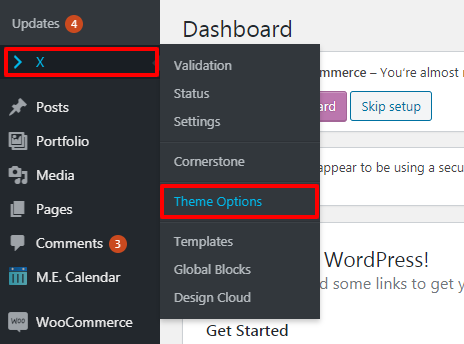
Now click on CSS
Thanks
Thanks very much indeed. It was indeed an elementary question, but that light grey text is sometimes a little too faint for my eyesight.
Could I bother you with a related query?
I needed to know how to edit the CSS in order to follow some very helpful advice provided by one of your colleagues in a separate thread
Your pointer + the suggestion in the other thread were enough to allow me to fix the problem I was having with the h5 tag in my Essential Grid posts. They now align better with the right-hand sidebar. I adapted the suggestion for the H4 and h6 tags as well.
But having fixed the Essential Grid posts, I realized there is a similar problem with h5 tag on the ordinary pages in the site - it creates too much space at the top of the main column.
Since the solution for the Essential Grid posts was to adjust the “.essential_grid h5” tag, I wondered whether there was a similar fix for the “.something h5” tag on the ordinary pages. Seems like it should work, but I can’t figure out what the “something” should be.
Grateful for any advice you can provide.
Stephen Yeo
Finchley Society
Hey Stephen,
Targeting h5s in the Essential Grid requires you to use the Essential Grid class .essential_grid.
Similarly, you want to use your own class or just h5. You will need to learn CSS if you wish to understand CSS better. Another thing you would want to learn when working with custom CSS is how to use a browser’s element inspector.
If you have more questions on custom development, please consider signing up to One where we can answer tech questions beyond what our theme provides.
Hope that helps and thank you for understanding.
Thanks very much for the guidance.
Regards
Stephen Yeo
Finchley Society
Hi Stephen,
You’re welcome and it’s our pleasure to help you. If you have any other concerns, feel free to reach us.
Thank you.
This topic was automatically closed 10 days after the last reply. New replies are no longer allowed.
