Hello, I previously had my home page as a full screen image using Rev Slider. There is a plugin error with Rev slider, I’m unable to update it. Is there another way to set the image to full screen using CSS? I don’t need any slider functionality, I only want to use a single image. Ideally I want to accomplish this without using Rev Slider plugin. Thanks!
Hey @ktknowles07,
There is no domain registered to your license so I could not advise if there’s a simple CSS to fix your issue.
Since you’re using X though, if your image is on top of the Masthead (header), you really need to use Slider Revolution or LayerSlider as those are the only ways as they can be added through the Slider Above Masthead under the Page Settings
If your slider can be placed below the Masthead, you can Cornerstone for your page and then add a Section in the topmost part of your page. You then set your image as a background and set the Top Padding of the Section to 100vh while setting the rest of the padding to 0.
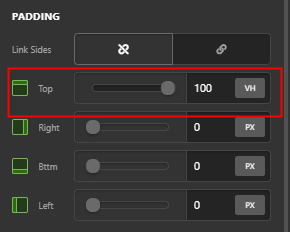
Hope that helps.
This topic was automatically closed 10 days after the last reply. New replies are no longer allowed.