Video controls not working properly

Hello there,

I hope all of the team is doing great.

I’m working on this website :


And it seems that the vidéo displayed in home page doesnt work as it should . https://youtu.be/VJqLZgL1h2I

Everything is up to date, plugins and theme.

When i hover the “copy link” or anything else in the video, i am unable to copy the link or to click to the next video. It seems that the controls are not working except for lecture/pause.

Do you have any idea why this is happening ?

Thank you kindly,
Regards.
Hi Matthieu,

If you want access to the next video, you can add it as iframe instead. See this: https://screencast-o-matic.com/watch/cYVu2zwntY

<iframe width="560" height="315" src="https://www.youtube.com/embed/VJqLZgL1h2I" frameborder="0" allow="accelerometer; autoplay; encrypted-media; gyroscope; picture-in-picture" allowfullscreen></iframe>

Those are not available when using the native player on the theme. Please use IFRAME.

Hi Lely,

thank you for the quick answer.

This though, doesn’t fit my needs, as i want the player to be displayed full width, without sound, and on autoplay.

Is there at least a way to get rid of all the “unclickable” things like “copy link”, or “next videos” ?

kind regards

Hi Matthieu,

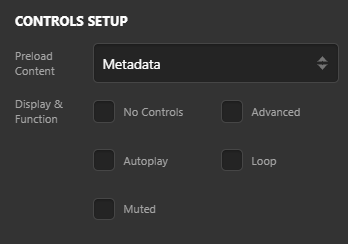
There’s a Muted and Autoplay option for the player

Here’s the complete details about the video element

Unfortunately, there’s no available option on the element to remove those copy link option. Please check in with youtube if there’s an option on their end.

Ok,

Thank you Lely.
i’ve uploaded one version of the video manually, it’s not optimal but i guess it works atm.

Thanks again. Keep up

You’re welcome. Glad we’re able to help.

This topic was automatically closed 10 days after the last reply. New replies are no longer allowed.