Vertically centre in screen

Hi,

I have a page with a background image (no menu or footer), and I have 2 columns with just content on the left.
Pro have ways to align content inside a row or column, but not for the overall screen.

  • I would like to know how can I make the only section (row and column) I have to be aligned vertically in any screen.
  • Also, how can i align the page background image to the right?

Thank you

Hello @PanInternational,

Thanks for writing in!

The given credentials is not working for us.

To display the column at the center or middle of your browser screen, please enable the flexbox layout in the column settings. For more details about Flexbox option, kindly check this out:

Or you can check out our Youtube tutorials:

Best Regards.

Hi @ruenel

Thank you for your reply.
I had to do some twicks, but it worked.

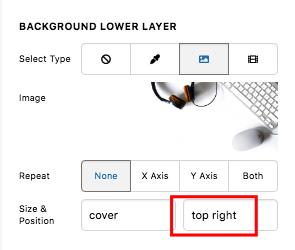
Can you just clarify how can i make the background image align to the right?

Thank you

Hello @PanInternational,

By default, the background image will display in the center. If you want it to change its position, you can insert bottom right or top right in the position option.

hXiLxVVYTwKvMR2EiZsrvA

To learn more about background positioning, please check this out:

Best Regards.

This topic was automatically closed 10 days after the last reply. New replies are no longer allowed.