Still no editing available in Cornerstone

Bit disappointed tbh I go on holiday for two weeks and my thread is closed:

Anyway, in response to @Rad I have no idea where or how Wireminds tracker got included in tinyMCE. I’ve certainly never even heard of it let alone included it so it must’ve come via a plugin. I’m not aware of any I’ve added or changed though! Deactivating them all makes no difference anyway.
To try to resolve it I once more deleted and re-installed Classic Editor as I figure that where the tinyMCE files originate. Now I appear to have lost the entire tinyMCE directory?!

O M gosh I just want to edit some text! I thought themes were supposed to simplify making websites!
:frowning:

Hi @Cosawes,

Thanks for reaching out.

The last reply was 12 days ago and a thread will automatically close after 10days without a reply.

As for clarification, these issues aren’t related to the theme. Wordpress is a modular type of platform where libraries, features, themes, and plugins could be created by multiple and different authors that may result to conflicts.

I checked it again and this time, the tinyMCE scripts are missing, perhaps you also deleted the ones built-in to Wordpress? Examples, http://www.*****.co.uk/wp-includes/js/tinymce/tinymce.min.js?ver=4920-20181217, http://www.*****.co.uk/wp-includes/js/tinymce/plugins/compat3x/plugin.min.js?ver=4920-20181217

And if you’ll go to Admin > Pages > Add New, you’ll notice that the editor isn’t working either because of those missing files and it’s not theme or builder related, they are just affected.

Please try re-installing your Wordpress core https://kinsta.com/blog/reinstall-wordpress/. Or if you still have the backup of deleted files then please re-add them. Deleting a plugin shouldn’t delete the core files, it’s not related to the Classic Editor plugin.

Thanks!

Thanks @Rad
My assumption that the theme was the problem because I have done nothing to the site in about four months aside from update X and plug-ins. I’ve not added anything, deleted anything. Just run updates. So how I got here is a mystery if an update wasn’t the cause.
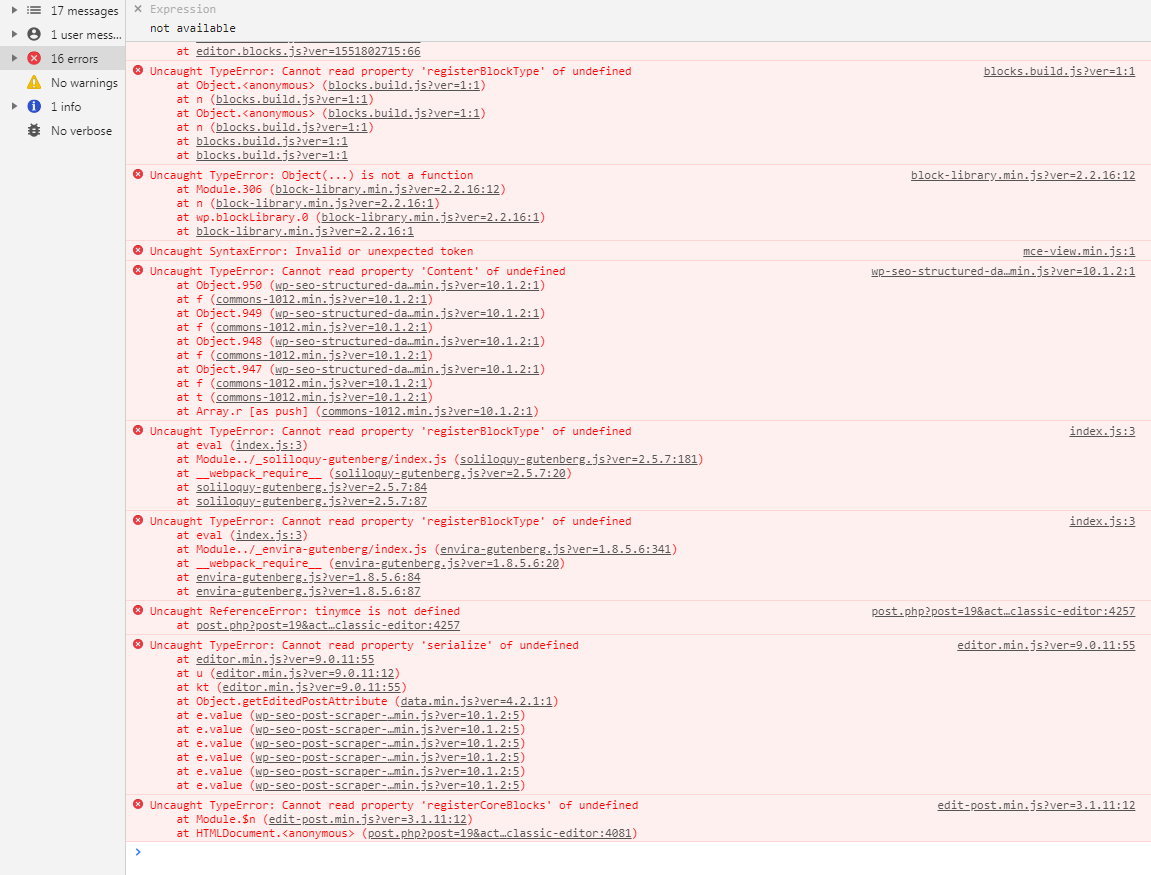
Having re-installed WP as you suggested I can see the tinymce files are back, thankfully! However, still no editor is working. I can see page structure etc. in Cornerstone but content vanishes when attempting to edit it. Classic editor (and block editor), despite the tinymce files having returned after WP re-install are still not functioning at all:

No idea what to try next! Grateful to anyone who can suggest a fix!
TIA

Hi @Cosawes,

It looks like the blocking is happening on your CDN end, as you can see on the screenshot you have posted above. Do you happen to be hosted with GoDaddy? If so, would you mind checking with your CDN service/host to see if they are blocking any scripts from loading?

Let us know how it goes.

CDN???
No we’re hosted by BT.
I will attempt to ask them, whatever CDN is!

Hey @Cosawes,

CDN is Content Delivery Network, a system of distributed servers (network) that deliver pages and other Web content to a user, based on the geographic locations of the user, the origin of the webpage and the content delivery server.

Please let us know how it goes.

You will be pleased to know that it transpires our host, BT (British Telecom) are aware of this issue and indeed had something in place which was causing many of their hosted sites to produce blank pages when editing a WP-based site. Having turned ‘it’ off at their end, whatever ‘it’ was, we are now able to edit once more. A shame BT should not have contacted all their customers running WP and made them aware instead of having to go through this route to find a solution!
Thanks for your support in any case.

Further to my last and for the benefit of those interested in the tech’ of the problem … this from the person at BT who resolved it;

_“This is caused by an incompatibility with the Pixel Code web analytics code used on your site by default. I have disabled the Pixel Code and you should now be able to edit your web site once more.”

Hello @Cosawes,

It’s really good to know that the culprit has been found.
We will keep this in mind as this might have also been the case of other users as well.

If you need anything else we can help you with, don’t hesitate to open another thread.

Best Regards.

This topic was automatically closed 10 days after the last reply. New replies are no longer allowed.