Sticky header 2 bars - gap and issues with vertical alignment

Hi
I’m trying to have 2 bars in the header sticky. Bar 1 contains the logo. It needs to shrink on scroll.
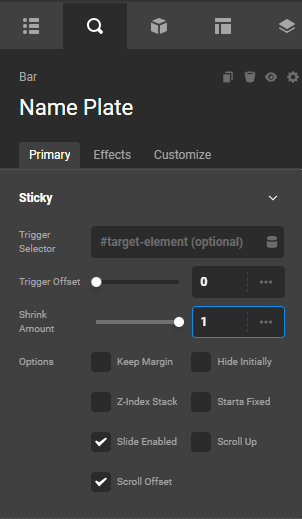
I set the “shrink amount” to 0.7
The logo stays the same size. I found another forum topic that suggested adding CSS to the element holding the image to make it smaller. It is smaller. BUT - the element doesn’t center vertically on the bar. It’s sitting below the bottom of the bar, cut off.
Also, the sticky bar (Bar 2) below has a gap between the first sticky bar.
I’m not sure how to make it so that both Bar 1 and Bar 2 are sticky, but Bar 1 and the contents (logo image) gets smaller while still keeping the logo centered vertically in Bar 1 and there’s no gap between Bar 1 and Bar 2 when scrolling.

BAR 2 SETTINGS

!
BAR 1 SETTINGS
!
CSS to make logo image smaller on scroll
!
Gap between Bar 1 and Bar 2 on scroll

Hello @Raychill,

Thanks for writing to us.

To help you with your concerns, we need to check your settings. I would request please share the admin login details meanwhile I would suggest you troubleshoot a few of the common issues before we investigate your settings. Please share your details in a secure note. Please provide the following details

  • WordPress Login URL
  • Admin-level username and password
  • Exact Header URL

You can find the Secure Note button at the bottom of your posts

Thanks

1 Like

Hey Rachel,

Since your Logo image element already has a custom CSS to change its size, you do not need to shrink the Bar element. Just set it to “1”.

Best Regards.

Ok - but just to wrap my head around this.

I set the shrink amount to 0.7 with no css on the logo element. No shrinking happens on the logo. It’s still big and cut off on the bottom.

So I find another how-to in the forum that says to add custom css to to the logo. Now the logo gets smaller but the issues is as described above with a gap and issues centering.

I’d love to shrink the bar below a little too. But none of the contents inside resize so they’re still big, off-center, and hanging over the edge of the bar.

So… does the “shrink amount” not work in general? Like, wondering how to use the shrink feature in future. I did watch the tutorials, but there’s nothing about having the elements inside the bar also get smaller.

Now there’s a gap between the two bars. Inconsistent - sometimes it’s fine, but majority of the time there’s a gap. How do we solve that?

Hello Rachel,

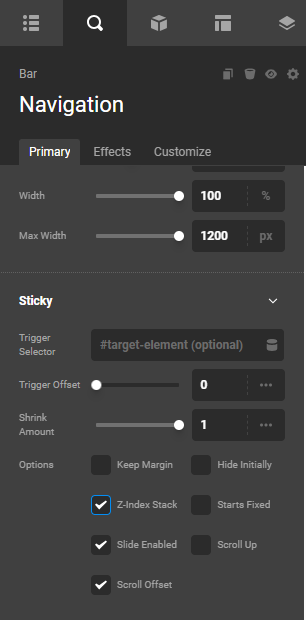
Enable the “Z-index Stack” in your Navigation Bar element.

Thanks.