Sticky Bars Header - Can't Center an Image

Hi everyone!

I took the Sticky Bars header template and am essentially trying to replace the big text area with an image. Trouble is, the image won’t center itself, and I’m not sure what to do to fix it!

Site is here: https://theroughgrand.com.

You’ll see the problem right away.

Any thoughts? I’ve been using Pro for years so I’m surprised I can’t fix this one myself, but…help!! Lol

Thanks
Steve
Hello Steve,

Thanks for writing in!

To resolve your issue, please do the following:
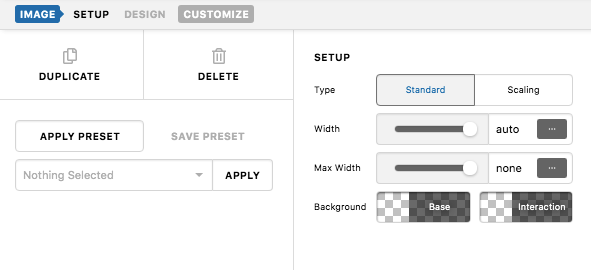
1.) Set the image width to auto.
txHBGRqpRticU11VUUHqgg

2.) And in your container settings, set the Child Placement in the Flexbox option to “Column”

If this is not helping, kindly provide us access to your site so that we can check your settings. Please create a secure note with the following info:
– Link to your site
– WordPress Admin username / password

To know how to create a secure note, please check this out: https://theme.co/docs/getting-support

Best Regards.

Hello Steve,

Since you want the buttons to be inline, you have to duplicate your container 1 instead. You can delete the buttons from the container 1 and remove the image element in container 2.

I went ahead and initiated the changes already. You may need to add some spacing for the image.

Please check your header now.

Ah, beautiful! Thanks so much for your help!!

Steve

You’re welcome Steve!
We’re glad we were able to help you out.

This topic was automatically closed 10 days after the last reply. New replies are no longer allowed.