Section image scaling for other devices

Hello, I need the image of a section to scale with different device screens. Currently the image in the section just zooms in when seen from other devices. What I really need is the image to be full page and seen in all screens properly.

https://gaiaferoz.com/opt-in/

If there’s another suggestion on how to accomplish this let me know as well. I’m trying to create what’s called a cover page on other platforms I believe, or like I said simply a page with the image as background fully responsive with the text over it and the signup form.

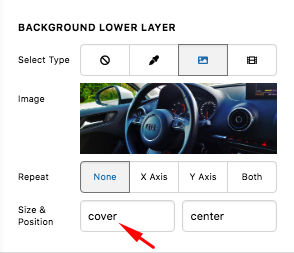
Hello Gabriel,

Thanks for writing in! I would like you to try this demo here: https://davidwalsh.name/demo/background-size.html which would explain how background image works.

We use the background-image: cover; which would cover the whole area of the container. This is responsive enough which will always covers the whole area. The only thing to consider here is that if your image size is smaller, it will be stretch out and if you have a bigger image, it will get cut off.

Yes we can use background-size: 100% 100%; which is also responsive but your image will either be stretch out or get squeezed depending on the size of the container.

Yes we can also use background-size: 100% auto; but then as soon as you resize your browser or on smaller screen sizes, you will probably have white spaces around the image.

Or we can also use background-size: contain; but then this is not a good choice because you will see white spaces around your image.

Hope this helps.

Thanks so much for the response. I have a newbee question, where do I apply that CSS? I tried using it in the Section that has the background image, Customize, and Element CSS and inline CSS but I see no changes.

Is there something I have to do extra? I have very little experience with CSS but I know I can manage. Could it be some setting I have that prevents me from previewing the change?

Thanks in advance :pray:

Hello Gabriel,

You do not need to add any custom css. In the background options, find the Size option and insert the background size.

If you don’t see some of style options, you need to turn on the Advanced Mode by going to the Settings > Preferences > Advanced Mode

Best Regards.

Thanks for the clarification, I’ll see what option best suits me for it. Much appreciated!

You are most welcome!

This topic was automatically closed 10 days after the last reply. New replies are no longer allowed.