Section bg image is a thumbnail file

Hi

I tried to rebuild a page with the new update, and have found that, when i set a bg image on the section, it takes a thumbnail file instead of the full image.

You can check the page here: http://hs.bymarkvig.dk/
I left the “old” section for show.

Cheers :slight_smile:

Howdy, @rbitfoto! Thanks for writing in. This is actually something we changed in this release to bring in more control from the WordPress Media Manager. When you click the image selection control and you see the modal pop up, you’ll want to look for this input:
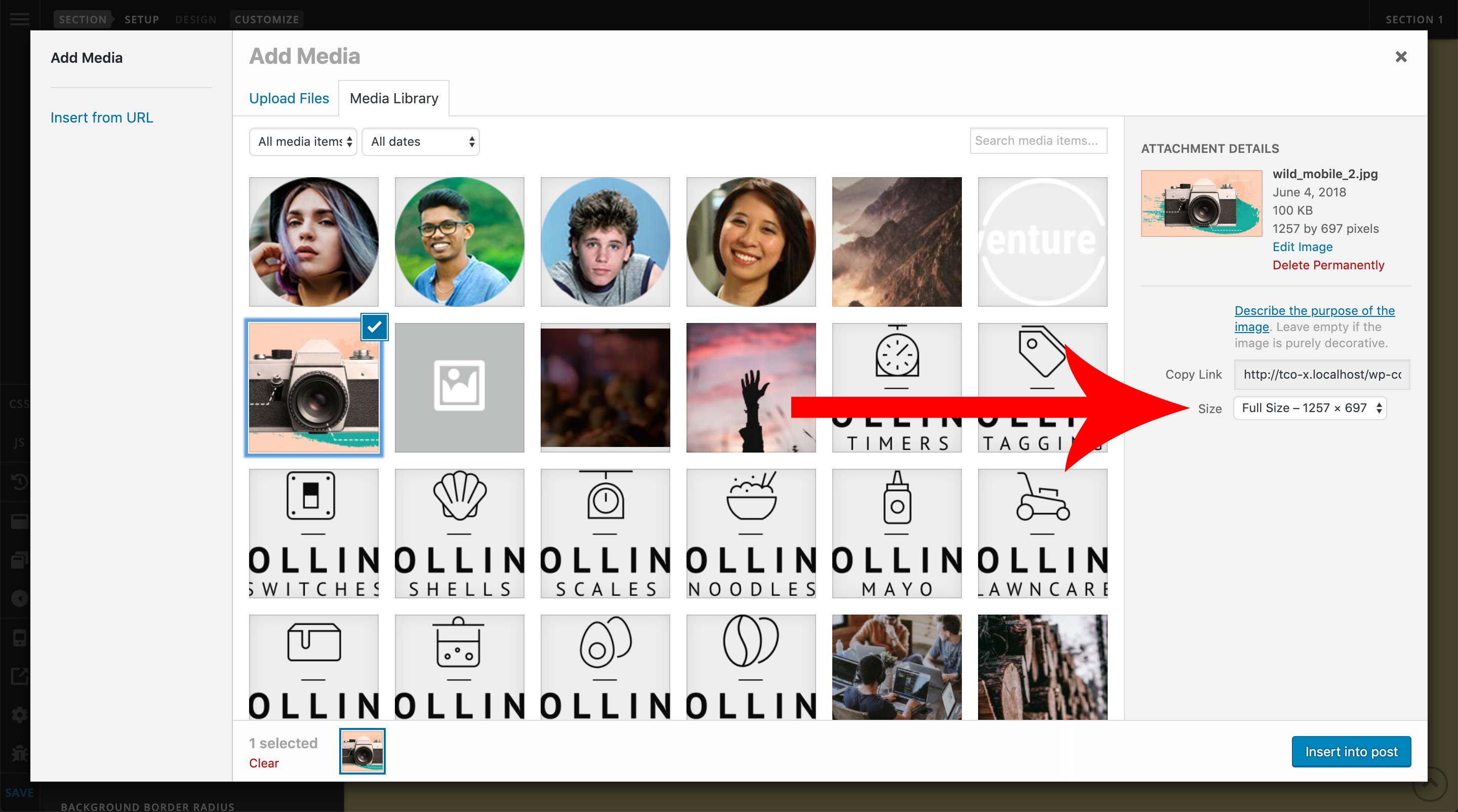
That will allow you to select the size of image you want to use for your particular section. This is great for situations that are smaller such as a Column or Card, where you do not always need the huge file to cover everything adequately.

Hopefully this helps, cheers!

Dang it … I didn’t see that. :slight_smile:

Definitely easy to miss if you’re just in the usual flow of things. Maybe we can find a way to make it use the full size image by default to save that extra click.

Update: Done. It will now default to the full size so the experience is identical to the way it was before.

1 Like

Update: This just went out in beta4. Sorry, we didn’t have it merged in beta3