Revolution Slider 7 - Text Moves Around Now

Hi there,

I have been using your bundled plugin Revolution Slider for many years, being very happy generally. I am getting to grips with the new version, and there is something I just can’t figure out.

When adding 2 text layers, the old version used to keep the gap between them the same even when screensizes were different. In the new version, if you change the screen dimensions, the text layers move all around the place and the gap between them isn’t respected.

I find this an odd choice to include as a default, as this has not been the case with previous versions.

Please let me know how I can switch this off, so the gap between the text layers is respected on all screen sizes

Video below

Hello @EarlySigns,

To help you with your concerns, we need to check your settings. I would request please share the admin login details meanwhile I would suggest you troubleshoot a few of the common issues before we investigate your settings. Please share your details in a secure note. Please provide the following details

  • WordPress Login URL
  • Admin-level username and password
  • Exact page URL

You can find the Secure Note button at the bottom of your posts

Thanks

Secure note added, thanks

Hey @EarlySigns,

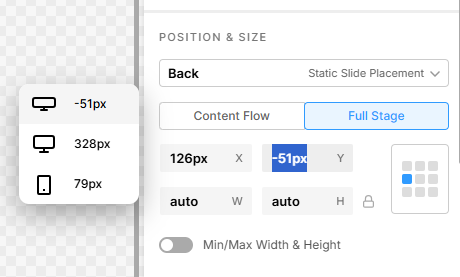
Play around with the Position and Size:

image

Default -> Back
Content Flow -> Full Stage

And check out this video tutorial as well:
https://www.youtube.com/watch?v=rUQUfjp5i7s

Best Regards.