Ok thanks for taking the time to test this and see that its not working for the Product Category Archive condition.
I’m still having problems with the Product Category condition (for selecting a specific category) as well. I still have the problem that it only works for the category in a specific language, and I am only able to choose a category in the main language of my site (Spanish in my case).
The setup:
So for example I have set up a test where I have a row that I want to only show on a specific category Ayudas de Juego (the original Spanish category) and its English translation Player Aids (which has already been created in WPML using the Category translation table).
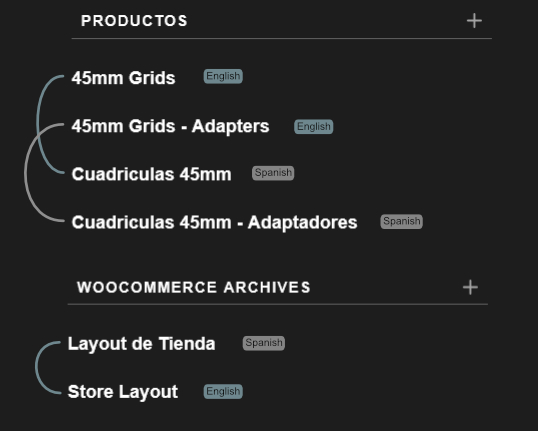
The row with this condition is on my Spanish store archive (Layout de Tienda), but this archive has also already been translated with WPML (Using the Advanced Translation Editor) and in Cornerstone it shows up as two separate archives: the Spanish (Layout de Tienda) and the English (Store Layout) [see image below].
I am confused as to why the translated archive is showing up in Cornerstone? I thought that with the removal of the WPML Advanced Bulider (which is turned off) pages should only exist once in Cornerstone (in the original language), and all translations are either done with the WPML advanced translation editor, or by using twig templates on the original language version in Cornerstone.
- Is the translated archive showing up in Cornerstone as two separate archives normal behavior?
- I am seeing this duplicate behavior with translated products as well [see image below]
The Problem
When I go to the conditions editor I am only able to choose a category in the main language of my website (Spanish in my case) [see image below]. So I can set the row to only show up for Ayudas de Juego and it does show up on that category, but if I switch to the English version of the category Player Aids it does not show up. Ideally I would expect the condition to apply to the translated category as well (with no work on my end).
If that’s not possible it would not be a problem if I was able to select categories from both languages when creating conditions in Cornerstone, for example:
A: If the current behavior of translated archives showing up separately in cornerstone is correct [see image above] I would simply set the condition on the row on the Spanish page as “Product Category: Ayudas de Juego” and on the English page as “Product Category: Player Aids”.
Right now the condition editor is only showing Spanish conditions, both when I edit the Spanish store archive (Layout de Tienda) or the English store archive (Store Layout).
B: If translated pages are NOT supposed to show up in Cornerstone (my question from above) I would simply set up the condition on the row in the singe archive as “Product Category: Ayudas de Juego or Product Category: Player Aids” and it wolud work in both languages.
In either case this is not possible right now because I have no way to chose conditions in both languages within the cornerstone builder, only categories from my main language are listed:
I wonder if not showing categories in both languages is behavior that is left over from the
WPML Advanced Bulider way of doing things and its simply been missed because no other user has tried to set this up since.

