Problem with archive page

Hello.

I’m trying to setup my archive page to show posts in a single column and to reduce the featured image size.

I’ve found several tips on the forums, but for some reason, my changes aren’t getting saved. If you have a look at my archive page you’ll see that it has a single column, but it’s not showing the featured image for the first blog post and the featured images are too big.

Can you please help?

Hello @Jacko_Pinto,

Thanks for writing in! I have logged in and I edited your blog layout. The featured image seems to have displayed.

To get familiar with how you can create and customize your blog index, kindly check out this first:

If you wouldn’t mind, please send us a mock layout of how your blog index would look so that we can give hints in creating your blog index layout.

Best Regards.

Thank you very much Ruenel. I don’t know what I did. But my archive page now shows the featured image centered (like the attached) on a single column.

Now, this what I’d like to achive (three colums like this mockup)

Thank you very much for all your help!

Hello @Jacko_Pinto,

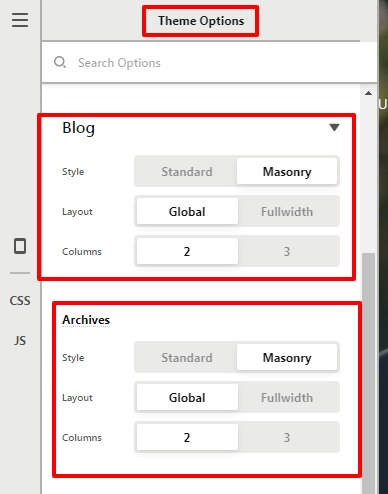
I checked your site dashboard it seems that you have only 2 posts on your server and to display the post in 2 columns on the blog page and archive page. Go to the Pro--->Theme Option-->Blog-->Column.

Theme-Options-Pro (2)

Hope it helps
Thanks

Thank you. It seems the issue was that I only had to posts. I’ve made it 4 and it looks better.

Now, can I achieve the attached mockup? Thanks!

Hello @Jacko_Pinto,

Yes, it should work for you. I went ahead and set 3 columns on the blog settings. If you add more post, it would automatically take the masonry layout as per your mockup Please have a look at the given screenshot in the secure note.

Thanks

This topic was automatically closed 10 days after the last reply. New replies are no longer allowed.