Pro / Cornerstone — Slide Container autoplay never starts
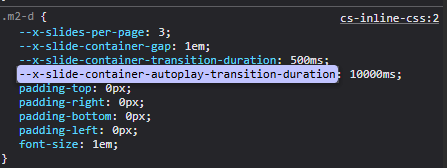
Summary: On a Slide Container set to layout_type: inline, enabling Autoplay has no effect. The slider renders and paginates correctly, and manual navigation works, but it never auto-advances. The autoplayDuration value does not appear in the slider’s runtime config attribute regardless of what it is set to, which appears to leave the autoplay timer without an interval.
Environment
| Pro (parent theme) | pro |
| Cornerstone / slider bundle | cs-sliders.7.8.9.js, cs-classic.7.8.9.js |
| Child theme | Testifying Training by MADLAB Design, LLC 1.0.0 |
| WordPress | 7.0.2 |
| ACF | ACF PRO 6.8.7 |
| Host | Bluehost |
| Other active plugins | Posts Table Pro, UpdraftPlus, WordPress Importer |
| Browser | Chrome (current) |
Element configuration
Slide Container, inside a Row → Column, with a Slide Pagination element as a sibling. The single child Slide is a Looper Consumer; the Slide Container is the Looper Provider (query-string, post_type=testimonial&posts_per_page=9&orderby=rand), producing 9 slides / 3 pages at 3 per page.
Relevant params as saved:
layout_slide_container_layout_type = inline
layout_slide_container_inline_slide_basis = paged
layout_slide_container_inline_page_count = 3
layout_slide_container_inline_gap = 24px
layout_slide_container_inline_scroll_by = page
layout_slide_container_inline_wrap_around = true
layout_slide_container_autoplay = on
layout_slide_container_autoplay_duration = 4500ms
Expected
Slider auto-advances one page every 4500ms, wrapping at the end.
Actual
Slider never advances. It stays on page 1 indefinitely. Verified by sampling the active pagination item and the container’s computed transform at 5s intervals over 15+ seconds — both are unchanged throughout.
Key observation
The runtime config on [data-x-slide-container] contains every other autoplay setting except the duration:
{
“keyboardNavigation”: true,
“autoplayStartInView”: true,
“snap”: true,
“wrapAround”: true,
“direction”: “forward”,
“startingSlide”: 1,
“autoplay”: “on”
}
autoplayDuration is absent. It stays absent whether layout_slide_container_autoplay_duration is set to 5000ms (the default), 4500ms, or 6000ms — so this is not simply the serialiser omitting a default value. Our working theory is that the autoplay interval is therefore undefined and the timer never starts.
Ruled out during diagnosis
- Script loading — cs-sliders.7.8.9.js is present and loads. No console errors or exceptions on the page at any point.
- Custom CSS interference — we had overrides on .x-slide-container and .x-slide. Removing all of them changed nothing.
- autoplayStartInView — fails with both true (element scrolled well into view, observed for 15s+) and false.
- Markup / pagination wiring — the Slide Pagination element renders the correct number of
- items, and the container exposes --x-slide-current and --x-slide-total correctly (1 and 3).
- Not a rendering problem — a real mouse click on a pagination dot navigates correctly and updates --x-slide-current. So the slider’s navigation logic is functional; only the autoplay trigger is not.
Additional note that may be relevant
The slider appears to require trusted events. Programmatic element.click() on a pagination
Reproduction steps
- Pro child theme, Cornerstone editor, new Page.
- Add Section → Row → Column.
- Add a Slide Container; set Layout Type to Inline, Slide Basis to Paged, Page Count 3, Wrap Around on.
- Add a Slide Pagination element as a sibling of the Slide Container.
- Set the Slide Container as a Looper Provider returning ≥ 6 items, with its child Slide as Looper Consumer. (We have not tested whether the bug also occurs with static, non-Looper slides — worth checking, as the Looper may be relevant.)
- Enable Autoplay, set duration to 4500ms. Save and view on the front end.
- Observe: no auto-advance. Inspect [data-x-slide-container] — the config JSON contains “autoplay”:“on” but no autoplayDuration.
Question for Themeco
Is autoplayDuration expected to be emitted into the data-x-slide-container config? If so, what would prevent it from serialising here — and is there a known interaction between Looper-generated slides and the autoplay timer?
Current workaround
Testimonials were rebuilt as a plain Looper track with ~40 lines of custom JS handling autoplay, pagination dots, hover-pause and responsive breakpoints. The Looper is unchanged; only the slide mechanism differs. We would prefer to move back to the native Slide Container once this is resolved.