Hi @christian,
Thank you for the reply and your guidance is helpful. I appreciate the flexibility and power of creating your own templates with the layout builder, and I have used dynamic content creating my own components. Since I’m not a professional web developer, this seems to be a lot more work than I really need for a single site. Not to mention that the video you provided is a couple years old and a bit dated. For example, many of the >Admin>Pro options no longer exist:
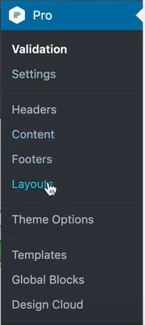
Don’t get me wrong, following the video I could take the time to create a new layout from scratch (as all the available templates do not come close to the renew stack), but I really like the renew stack template and have spent a lot of time styling it the way I want. I will have to weigh the amount of work versus the requirement of the outcome.
Interestingly, I did find this post in the archives which shows how to create a custom x_renew_entry_meta() function. Pretty much exactly what I needed. What I don’t know yet is how this will affect the blog post versus the portfolio post.
If that doesn’t work, perhaps I’ll try to figure out a custom jquery return like I did for the mouseovers: $(".x-iso-container-posts .entry-wrap a").attr( “title”,“Click to Read More” );, or maybe a filter applied in the functions.php file. Maybe I can, maybe I can’t, but I’ve seen others trying to do the same thing in other forums. Update: Not needed. See below update.
I did however find a simpler way to disable all the links on both the categories and the tags by using the custom CSS: .p-meta { pointer-events: none; } (for categories) and .x-li-icon { pointer-events: none; } (for tags). This seems like a shotgun approach and while it achieves the outcome I wanted, I’m not sure I like it. If the above custom meta function works, I can just not have links on the categories. Update: Not needed. See below update.
I know this is beyond the support you are able to provide here but I appreciate your guidance.
Update: I managed to find the renew stack functions php and copy the x_renew_entry_meta function into the child functions.php file (the one in the linked post above was really old). I was then able to modify as needed and it works great. For others looking for the base functions file, use Admin>Appearance>Theme File Editor, select the Pro theme, and navigate to /framework/legacy/functions/frontend/ and select the name of the stack you want. And ALWAYS use a Child Theme for any modifications so Pro updates don’t overwrite your changes.


