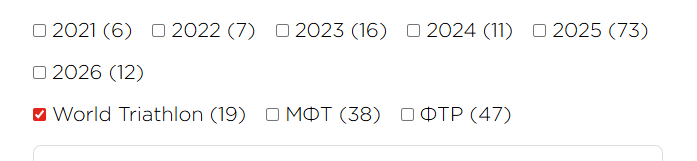
Thank you @prakash_s,
I observed that my facets in the CS Form are no longer functioning. Maybe this is the reason why maybe not. Before the recent update they worked. This is the page link.
Thank you @prakash_s,
I observed that my facets in the CS Form are no longer functioning. Maybe this is the reason why maybe not. Before the recent update they worked. This is the page link.
Hey John,
There is an ongoing JS error in your page. It happens because you have inserted this JS code:
/* <![CDATA[ */
<script>
    // Установка cookie с возможностью указания срока
    function setCookie(name, value, days) {
        let expires = "";
        if (days) {
            let date = new Date();
            date.setTime(date.getTime() + (days * 24 * 60 * 60 * 1000));
            expires = "; expires=" + date.toUTCString();
        }
        document.cookie = name + "=" + (value || "") + expires + "; path=/";
    }

    // Получение значения cookie по имени
    function getCookie(name) {
        let matches = document.cookie.match(new RegExp(
            "(?:^|; )" + name.replace(/([\.$?*|{}\(\)\[\]\\\/\+^])/g, '\\$1') + "=([^;]*)"
        ));
        return matches ? decodeURIComponent(matches[1]) : undefined;
    }

    // Основная функция проверки наличия cookie
    function checkCookies() {
        const cookieNote = document.getElementById('cookie_note');
        const cookieBtnAccept = cookieNote?.querySelector('.cookie_accept');

        // Проверка наличия cookie
        if (!getCookie('cookies_policy') && cookieNote && cookieBtnAccept) {
            cookieNote.classList.add('show');

            // Обработчик клика на кнопку согласия
            cookieBtnAccept.addEventListener('click', function () {
                setCookie('cookies_policy', 'true', 90); // Срок хранения 3 месяца (90 дней)
                cookieNote.classList.remove('show');
            });
        }
    }

    // Инициализация
    document.addEventListener('DOMContentLoaded', checkCookies);
</script>
/* ]]> */
You cannot have <script> in Custom Code > Global JS or Custom Code > Page JS. You should use a Snippet plugin to properly insert the code on the page.
Cheers.
Hi @ruenel,
I totally forgot about that experiment, thanks. I have removed it. One error disappeared but I’m not sure it made a big difference, though. I will check the log again after some activity. Filtering doesn’t work still and there are errors returned in the browser console when it clicked.
Hello John,
You will have to be consistent in naming the fields.
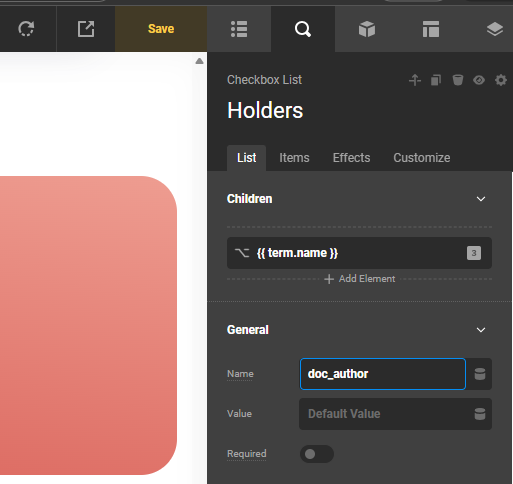
In your layout, the field name is “document-author”. Make sure they have the same names, or else the form will just filter to the wrong field name. Hence, displaying nothing.
Change it to the same field name “doc_author”.
Thanks.
I totally agree with the consistancy. I didn’t make the taxonomies naming in a consistent way unfortunately, but I can’t change them now since the terms are already created and used in many CPT posts. Changing that will break the data linking.
I thought we should use taxonomy names, not Field Group field names, to connect filters. Isn’t it? That is why you see different names of the taxonomies in the Documents CPT.
I have done a search-replace for Documents holders taxonomy. Now instead of document-author it is doc-author in the same way as doc-year. CPT fields have underscores instead ‘-’ like doc_author and doc_year. Hopefully I did it correctly. If everything will be okay I will also replace document-type to doc-type. But this is formality. That doesn’t solve the issue.
Some other questions have been raised.
Hello John,
I have created a test layout out of your component. It seems that the filter works.
Check this out:
To avoid getting things mixed up, I highly recommend starting each inquiry in a new thread. This is to make sure that every inquiry is responded to and investigated if needed.
1.) You can actually use the Toggleable feature in your submit button to close the modal or off-canvas. Check this out: https://theme.co/docs/toggleable
2.) Your checkboxes will not line up because they are an independent group of items:
You would need to merge them using a single checkbox list item.
Thanks.
Thank you @ruenel,
It looks like magic. I compared your test layout with my component and could not find any difference. I need to spend some time to check everything thoroughly and test out what you suggested in regards to Toggles.
Thanks again and sorry for mixing up requests which rise up along the way I fix something.
P.S. I am coming back after some experiments. New question: if we use single checkbox instead of checkbox list, how do we link it so it would be regognized as filter? Shall we put {{ term.slug }} inside General Value field or not? Its settings look a bit different from the lists. Also, the Reset Button does not clear its value when comparing with the checkbox list items. Can a single Checkbox form field be used with a loop at all?
I changed the top row of navigation in your test template. I left some of your Checklists in the second row untouched, but now they don’t work. I do not really understand what I should avoid to prevent breaking the facets. Oh, it seems like as soon as I add an addition condition to the archive settings it stops working.
In other words, I can’t use facets in the Archive if I combine the custom post type (CPT) condition with a taxonomy term condition. I also can not use them if the condition is a taxonomy alone. That approach would help pre-select just the posts I want to see in the respective archive looper provider and to manipulate them further on the respective archive page with filters. But it seems like it is not possible. The archive should have a single condition for facets to work, and it should be CPT not a taxonomy. Is that correct? How do we preselect specific facets then? We might need to make a link to specific documents types or docs with a specific taxonomy only or a combination of those.
I have made another test example with toggles as you suggested. However, I had to add a versioning condition, so it does not apply to all Document categories yet. Filters do not work inside toggles even if we temporarily remove condition for another version. In the first dropdown there is a Checkbox List in the other two there are single Checkbox elements.
Hello John,
I would not recommend having the filter as a component. It would be much more difficult to troubleshoot with that kind of setup. It is much better to have the CS Form filter in a layout. Besides, you can always assign the layout to multiple archive pages.
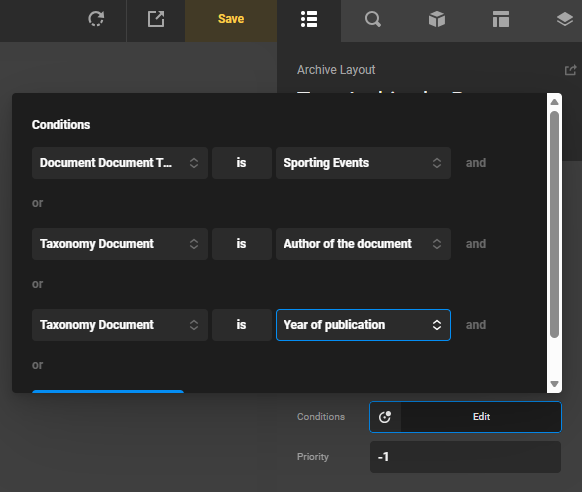
Since the checklists are Document Year and Document Author, merging them is not an option. They have to be separated. At the same time, your layout must be assigned to the Doc Year and Document Author taxonomy archive as well:
Check the demo now.
Thanks.
@ruenel,
Thank you for explaining this. I will experiment and come back if more clarifying questions rise up.
Can we do complex filtering using just CS Forms and tools in PRO like this, or do we still need some custom coding? I mean to have Upcoming events, Past events and All events in separate tabs so the filters in the dropdowns will still work right. And what should the assignment of the CPT and/or toxonomies for the archive be in this case? Should we assign Events CPT first or just the taxonomies linked to it (Year, Location, Category, Sport, Specification)?
The first question rose up.
I didn’t touch the assignments for the demo archive and dublicated Checbox Lists located inside Intro block then moved them into the dropdowns inside Drocs Nav > Filters. Then they don’t seem linked to the loop properly, although they have exactly the same settings. Is there anything else we should know about configuring Checkbox Lists inside Dropdowns, or this combination is not supported yet? The browser console displays the message “Failed to attach handler to element.”
You probably need to use “Inline” mode for the dropdown for that to work properly in a Form. Let us know if that helps.
Glad to hear that, John.
Hi again,
Another issue I am dealing with. I created another archive with the same setup for a different category of Documents called antodoping. When I filter the documents, the looper cards’ layout gets messed up. Why could that happen? I cleared the cache a few times already. That didn’t happen without filters in the dropdown. If I need to move this request to another thread, just let me know.
I thought I had found the way how to fix that but …
First I changed the ID of the CS Form although it doesn’t have submissions but that didn’t help. Finally, I edited the Change Selector, and then the layout stopped being messed up. Later I discovered that along with that filters stopped working. So the question is should selectors be unique across the entire site, or just within the template or page? Or perhaps they need to be unique within single CPT archives, since the filters are quite similar. How do they work and what has to be taken into account in that respect? Or maybe that is just my thoughts.
As you can see, I started to celebrate the fix too soon. Filters stopped working with the change of the selector although I put it in the section ID for the looper as well. Then I got a critical error when I tried to access Cornerstone so I have no access to it anymore. Word Press back-end of the site still works. Is there a way to try to get access to Cornerstone somehow?
P.S. The last automatic backup at my hosting was on March 20th. I haven’t set up my local backups yet, so I will lose a lot of work if I have to go back to that server snapshot. Is there a way to try to make CS live again and change my recent edits with CS Form Filters?
Hey John,
As I have mentioned in my previous reply, the layout must be assigned to the taxonomy archive page as well. The CS Form filter does not query the database. It uses the WordPress query and returns the items from the WordPress loop. So, your layout assignment would be:
Document Type -> Anti-Doping
OR
Taxonomy Document -> Doc Year
OR
Taxonomy Document -> Document Author
Then, your filter should work.
Hope this helps.
Hey @ruenel,
That is exactly what I did. I also copied the layout and updated the Looper Providers for Checkbox Lists because some specific terms from Doc Year and Doc Holder needed to be hidden for the Doc Type Anti Doping. Filtering for Anti Doping was working at that point of time but the layout of the doc cards was broken as I showed here.
While waiting for the reaction of you guys I decided to try to look for a solution myself. My experiments were related to changing the form ID as well as the Change Selector. The last one was also updated in the looper container ID settings so they would be properly linked. That fixed the problem with the layout of the document cards, but the filters were not really filtering the document posts although they were linked. I could see it with the Loading Area animation. And then the critical error appeared, and Cornerstone was no longer accessible.
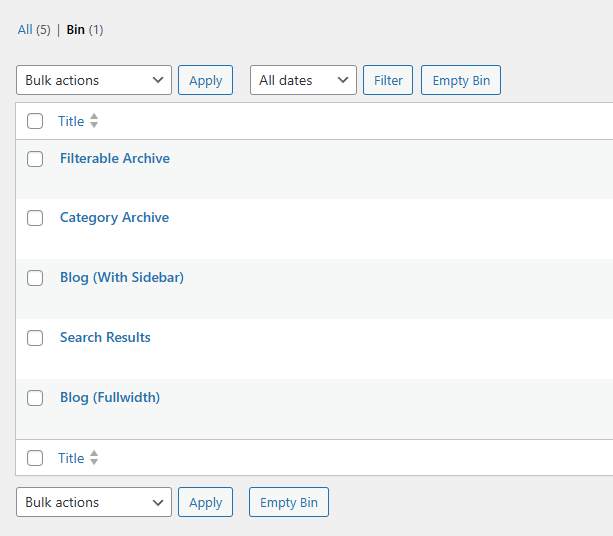
Word Press back-end and site front-end were still alive. Unfortunately I didn’t check the PHP log for the site. That could give you more info on the reason for what happened. Then I tried to rename plugins one by one as we usually do when something like this happens. That didn’t help. Then I looked at the new Conerstone menu in the backend of WordPress. I checked the Archive layouts because I thought about deleting the new archive layout with the Anti-Doping form to potentially solve the issue. I saw a Trash link there and checked it a few times. I couldn’t understand why some of the layouts were shown both in All and in Trash categories. Here you can see that Archive Layouts Trash shows 7 items but by the fact it contains more. Then, probably due to frustration, I emtied the trash. But it turned out that the items located in trash by the fact were not trash items. Of course that influenced the front-end. That left me with only one option: to initiate hosting provider snapshot restoration which unfortunately was made 10 days ago. My local backups on a site per site basis were not set yet.
I’m not sure this information will help you find the problem as it is difficult to replicate the issue, but it is definitely related to filtering in CS Forms. What I can try to do when I restore what I need for the last 10 days is I might try to move the layouts to a test site and to recrate the issue there. I will need to fix the problem with the SiteDrive after backup restoration first to be able to do that. However, it is not the only way to make a site copy.
Hello John,
The number of layouts in the Bin (Trash) is a bug.
I will be reporting this to our developers.
On the other hand, this does not contribute to your layout issue, where in the CS Form Filtering is not working.I have a hunch that this is because of the layout assignment. Be advised that when there are more than 1 assigned layout to a taxonomy Doc Year or Doc Holder, this can create a conflict. I highly recommend that you unassign the several layouts that you currently have and work on your custom archive layout one at a time.
Hope this makes sense.
This topic was automatically closed 10 days after the last reply. New replies are no longer allowed.