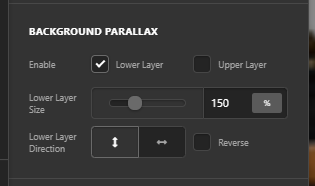
Hello! I somehow created a lovely back end of my homepage through much trial and error! I really won’t want to mess it up! Screencast here:
https://screencast-o-matic.com/watch/cY1QYxCIhj
However, when I look at the LIVE site on the latest Chrome, there is no parallax effect.
https://screencast-o-matic.com/watch/cY1QY4CIhx
Please read:
-
I cleared the cache, do it regularly throughout development.
-
Browser details: https://www.whatsmybrowser.org/b/UXYWV
-
I don’t know if it’s an issue to do with having TWO parallax areas on the homepage?
-
I used this CSS for the images:
.x-bg-layer-lower-image {background-attachment:fixed;}
And a min-height:500px
EDIT: Changed to .x-section [class^=“x-bg”][data-x-params*=“parallax”] {
background-attachment: fixed;
}
after I read a recent help post. -
I followed ALL the instructions and tutorials I could find anything recent online, and in your docs it didn’t help as there was not much detail.
-
Not using a child theme (by the time I realized, it was too late as had already worked a lot on the site, Oops).
It would be nice to know what I’m doing wrong.
The site is still under construction, so please use the log in after viewing the screenshots, if it’s not obvious what the problem is.
I would rather not risk undoing my work which was hard to do, but want to know what’s going wrong here, if possible. Thanks!