Hello everyone, I would like to know how to remove the accent from the page title.
Another question: how can I remove that box seen in the picture? surrounds all content created by cornerstone. thank you so much

Hello Paola,
Thanks for writing in!
To remove the box as seen in your screenshot, please edit the page and change the page template to Blank - No Container | Header, Footer. For more details about the different page templates in the theme, please check this out:
And by the way, you can remove the accent in the custom headline element settings which you need to edit the page.
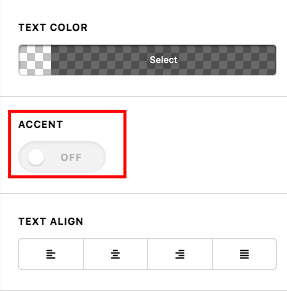
We would love to know if this has worked for you. Thank you.
I would like to remove the accent from the title CERTIFICAZIONI.
this setting is set automatically on each page that I am going to create after the transfer to the main domain (therefore the title is put centered and with the accent).
I leave you the link to the old and new site:
https://3caedificatoria.it/new/certificazioni/ (old site)
https://3caedificatoria.it/certificazioni/ (new site)
I’d like to get it all back like the old site
thank you so much
Hey Paola,
It looks like someone or something has modified the parent theme because you should be getting the same output as your old site. In the new site, the CSS loaded for the stack is different.
Please first deactivate all SiteGround optimizations and clear all caches including the browser’s cache then check if the issue will persist.
If it does, please try reinstalling X and Cornerstone.
If that still doesn’t help, please give us the following information in a Secure Note.
- WordPress Login URL of your old and live site
- Admin level username and password of the old and live site
You can find the Secure Note button at the bottom of your posts.

Thanks.
thank you very much! I solved by changing a setting of the siteground plugin on the minimization of css files! 
We are delighted to assist you with this.
Cheers!
This topic was automatically closed 10 days after the last reply. New replies are no longer allowed.