Mobile Breakpoint Question Followup

Hi, in reference to a question I asked about before https://theme.co/apex/forum/t/mobile-breakpoint-question/55178 (which now seems to be closed) I am not sure if you mean the code should go on each page / post / global block?

I’ve fixed the issue of the headings and text but the buttons are still overlapping since the breakpoint is only currently working when it gets to smartphone size. The code you supplied before may resolve this if I can add it in the best place?

Thanks in advance for your help.

Hi There @russell3

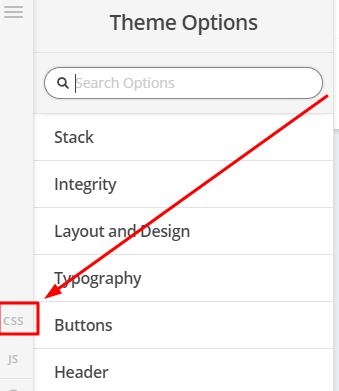
Thanks for writing in! Could you please try adding the following CSS rule into your X -> Theme Options -> CSS area and see if that helps.

@media(min-width: 768px) and (max-width: 1200px){
  .bottom-buttons {
    display: block;
    font-size: 80% !important;
  }
}

Hope that helps.

Yes I am trying to implement this and some of it is working so far. Thanks.

You are most welcome!

Hi, although this is helpful for the buttons I would still prefer if the cards themselves broke into 1 per line before it gets to the size of a smart phone. It seems to have 4 per line at tablet and even laptop size but working out how to set the right break point seems to be escaping me?

Hello @russell3,

I would recommend that you use this custom css instead:

@media(min-width: 768px) and (max-width: 1200px){
    .equal-height .bottom-buttons {
        display: block;
    }

    .equal-height .bottom-buttons .x-column.x-1-4 {
        width: 48%;
        margin-bottom: 4%;
    }

    .equal-height .bottom-buttons .x-column.x-1-4:nth-child(2n){
        margin-right: 0;
    }
}

The code will collapse the columns from 4 columns into two columns before it goes to one single column in smaller screens. The two column width should have enough space to display the button and the text contents.

Hope this helps. Please let us know how it goes.

Brilliant thanks

Glad we were able to help you :slight_smile:

Hi, in fact I thought this was now working but upon investigation the code you supplied seems to be forcing the middle two columns together whilst still not breaking the layout into two columns. Not sure why this is happening. I placed the code in Customise > Additional CSS ? Please see screenshot to see what I mean. Thanks.

Hi @russell3,

I tested the code and it works as intended.

Can you try adding it in Theme Options > CSS

If it doesn’t work in your end, please don’t remove the code. This is so we can check why it is not working.

Also, please don’t forget to clear your browser cache after adding the code.

Thanks

Hi thanks for help.

I have now re-added the code so you can check.

Many thanks

Hey @russell3,

I checked couple of your pages that have the equal-height columns and the code provided above is working fine. However you can replace the above code with the following code and add it in the Theme Options > CSS:

@media screen and (min-width: 768px) and (max-width: 1200px){
    .equal-height .bottom-buttons {
        display: block;
    }

    .equal-height .bottom-buttons .x-column.x-1-4 {
        width: 48% !important;
        margin-bottom: 4%;
    }

    .equal-height .bottom-buttons .x-column.x-1-4:nth-child(2n){
        margin-right: 0;
    }
}

Don’t forget to clear all caches including your browser’s cache after adding the code. Let us know how this goes!

Great thanks very much

Hi Russell,

In case you wanna read further about the previous suggestions, you may check the links below:

And glad to hear it’s sorted.

Cheers!

This topic was automatically closed 10 days after the last reply. New replies are no longer allowed.