Hi Guys.
I am having some difficulty getting my navigation menu right.
I would like to have the logo and the links inline which I think i have done however I would like to reduce the thickness of the navigation bar as the space on top & below is too big. Finally, the links have lines between them that are now stretched right to the top as you can see.
Is there any way to remove this?
Thank you for any assistance here.
Hey @NickGuide,
The thickness of the bar is caused by several things.
- The most important one is to eliminate the empty space in your logo. Not only does that add to the page weight which slows your site down, it would be tricky to work with that kind of space.
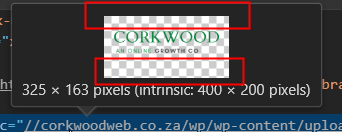
- After that, tweak the following Header settings in Theme Options > Header.
- Logo Width
- Navbar Top Logo Alignment
- Navbar Top Height (must not be 0)
- Play around with the rest of the alignment options under the Header options.
The lines you’re referring to, by the way, are part of the Ethos Stack design so there’s no option to change it. We do not offer theme customization as part of our theme support so if you need a highly customizable header, you might want to upgrade to our X theme to Pro..
Hope that helps.
Thanks, will see what i can do. Cheers
Glad we could help,
Cheers!
This topic was automatically closed 10 days after the last reply. New replies are no longer allowed.