Thanks for testing. After further investigation, I’ve found that the reason the condition is not working is due to how WordPress handles serialized data and how PHP / Cornerstone converts arrays to strings:
-
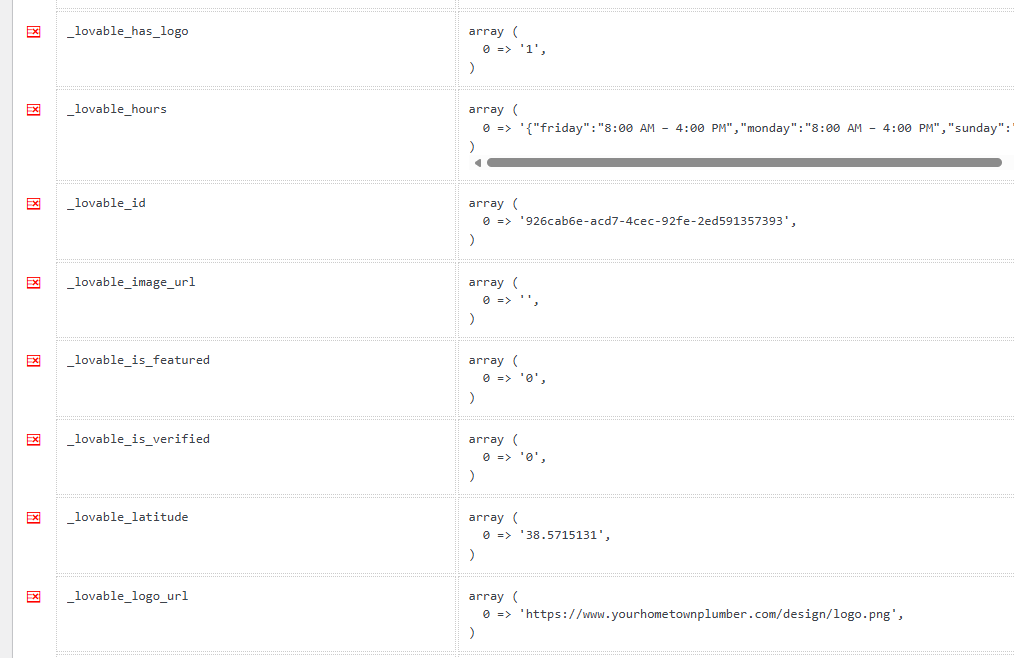
WordPress Unserialization: Because the meta key value is stored in the database as a serialized array
array( 0 => '0' ), when Cornerstone retrieves it via get_post_meta( $post_id, '_lovable_has_logo', true ), WordPress automatically unserializes it and returns a PHP array instead of a single string.
-
Array to String Conversion: Cornerstone’s String Condition requires a string for comparison. When PHP attempts to cast a PHP array to a string, it converts it to the literal string
"Array" (and may trigger an “Array to string conversion” PHP notice).
-
Comparison Failure: Since the parsed dynamic content evaluates to the string
"Array", any comparison you set up in your String Condition (such as comparing against "0") will fail because "Array" does not equal "0".
You can tell Cornerstone to treat the returned array as an object and extract index 0 directly within the Dynamic Content tag.
The Dynamic Content should be updated to {{dc:post:meta key="_lovable_has_logo" type="object" _key="0"}}
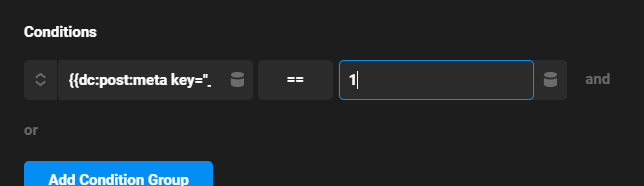
The correct Condition to use is then is the Number. You need to check if {{dc:post:meta key="_lovable_has_logo" type="object" _key="0"}} == to 1.
The Div is now hidden as you can see the headline is completely flush within the container while you maintain the logo showing up if it’s available.