Ok so this is a little more complicated than the title suggests.
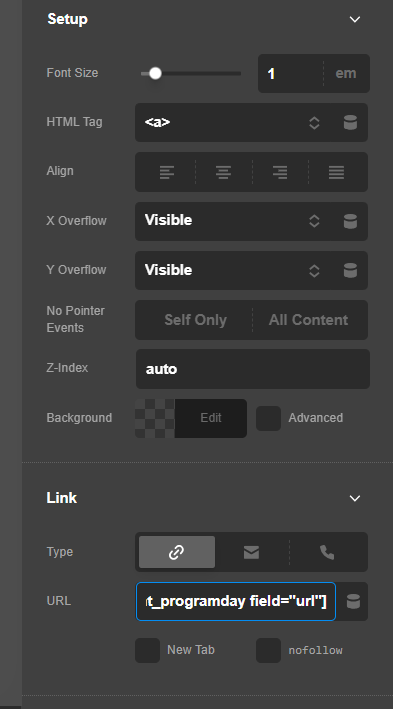
I have an element that i want to be clickable, so i have set it to have the html tag <a>. I have then placed a shortcode in the link field that renders the correct url. See screenshot below.
For testing purposed, i have placed that very shortcode in the element itself (visible to admin’s only via a condition). It outputs the correct permalink. However, when i click the <a> element that has that link it does nothing?
I have checked the mentioned page, and I could not find which DIV element has the issue. Please point me to the correct Section or Div element.
See the secure note below.
By the way, please make sure that the DIV element which will have your <a> tag is not wrapped with another DIV or equivalent element that is also using the <a> tag. Keep in mind that you cannot nest an HTML <a> tag.
In your screenshot, you’re on the looper. This element actually sits below the looper output, as a sibling to the parent of the element highlighted in your screenshot. It is the element with class therapy-library-today-card. Screenshot here below shows where it sits in the DOM.
I have now added a ‘today’ label to it and have added the shortcode inside the element too. That should make it easier to find. Also, i just checked and the element is not embedded inside an other <a> element? Would you mind having another look?
Your link setup looks correct but if you notice in your screenshot, your link does not have a URL. That is because the Dynamic Content for the URL is not correct. I’m not sure what you’re going for in there. Please clarify what you want to display and what URL should be used.
I’m not sure what you mean? The dynamic content for the link is a shortcode. That shortcode is also visible in the text field inside the element, and as you can see there, it outputs a valid url. Shortcodes also work for conditions etc. so I was expecting to be able to use them here also.
Your [enduuro_current_programday field="url"] was not recognized by the dynamic content field. You may need to add your shortcode so that it will be rendered. Perhaps, this old thread can help you:
Meanwhile, it is easier to include your link with the Raw content you currently have: