After the update, I’m experiencing a strange issue. When I create a section, I chose a layout, say 50%-50%, instead of showing them side by side, the editor stacks them. Urgent help needed.
Thanks in advance.
-I have the latest version of PRO
After the update, I’m experiencing a strange issue. When I create a section, I chose a layout, say 50%-50%, instead of showing them side by side, the editor stacks them. Urgent help needed.
Thanks in advance.
-I have the latest version of PRO
Hi Murat,
Thanks for reaching out.
Unfortunately, I can’t tell what’s causing this issue based on screenshots, but usually, the cause of any breakage after an update is the cache. Please check our troubleshooting guide here first https://theme.co/docs/common-issues
You can also try clearing the styling cache in Admin > X > Status, and test it again.
Thanks!
Thanks for the reply. Unfortunately, cache didn’t solve the issue. This is very interesting. When you pick a layout inside the section, as I’ve mentioned before, no matter what I choose, the presentation on the screen is stacked but… but, if you save the page and refresh, you get the correct visual presentation. This problem also applies to the grid element. It stacks too.
Hello Murat,
To better assist you with your issue, kindly provide us access to your site so that we can check your settings. Please create a secure note with the following info:
– Link to your site
– WordPress Admin username / password
To know how to create a secure note, please check this out: https://theme.co/docs/getting-support

Regards.
Here’s the information
Hey Murat,
Upon adding a 2 column row in your private test page in the Content Builder, the layout is correct. I saw the columns were stacking at first but when the builder got completely loaded, the layout was fixed. You need to wait for the builder to completely load.
If the issue persists on your end or the builder does not completely load, please try loading the builder in Firefox or Chrome Incognito. If you have browser extensions, please temporarily deactivate all of them.
Please also temporarily deactivate all 3rd party plugins as one of them might be the reason or is causing the builder to load slowly or stopping it from completely loading on your end.
Also, please watch out for HTML syntax errors like in your footer. This could cause layout issues both in the builder and live view.
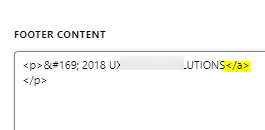
Hope that helps.
thanks for the reply. My case it’s just the opposite, it presents the correct layout for a flick of an eye, and it stacks right away. I checked the plugins by enabling/disabling, no luck there. I don’t have a footer, or a header and no additional html/css/js code, so no luck there either.
I’m on MS Edge, but the latest version, you know, it’s technically Chrome. It’s built on the same open source framework… but, I’ve installed Firefox and tried, it didn’t work either.
Two things at this point:
I have another site running on Pro, and with the same tools and plugins it works fine, everything is just expected. This brings me to a point, where it is directly related with the site, as they both run on same host with same settings.
Something is very strange, please check the attached screenshots. Capture1 is the problematic one where there’s a strange icon-y thing on top. Capture2 is the one working as expected and you don’t see that thing. This might be a starting point for you guys.
Any thoughts?
Hey Murat,
When I tested yesterday, I saw what you’ve shown in your screenshot but just briefly. Upon checking again now, it stays that way.
Because there’s no hints as to what is causing this, please give us your web host’s cPanel access also and we’ll do our best to find what’s causing this.
If you’re in a hurry though, please try out copying your site to another web host because the problem could might be coming from resource limitation.
Thanks.
This topic was automatically closed 10 days after the last reply. New replies are no longer allowed.


