This is likely a dumb question. I’m teaching my self Pro and trying to follow along with this Youtube video but get caught at 6:13 (https://www.youtube.com/watch?v=LJjEPflXB6Q). How do I get that “Dark Restaurant” Layout template option?
Hey Jake,
Christopher referred to the Design Cloud. For more information about the Design Cloud, please see https://theme.co/docs/design-cloud
Hope that helps.
Hi Christian,
Can you clarify which element in design cloud the “Dark Restaurant” template is in? He says “Defaults” but that doesn’t exist in Design Cloud.
Hi Jake,
You can find it from Design Cloud > Sites > Restaurant. It is part of the homepage. See it here: https://demo.theme.co/restaurant/
Hope this helps.
Yes, thanks for confirming. I believe I have an install issue. I have tried multiple times to install Site that from design cloud and it appears to work because it creates the pages but that Layout is not an option as a template.
Says installed:

but these are my only options
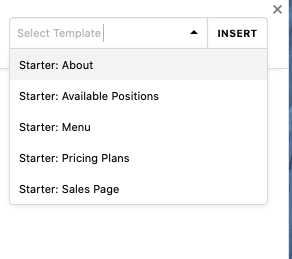
Hi Jake,
You need to save the section (or sections) of the page content before you can load it.

The saved template will go to Template Manager and that’s the time you can load it to your page.
Hope it helps,
Cheers!
This topic was automatically closed 10 days after the last reply. New replies are no longer allowed.