Layout Annoyance - Possible Bug

Hi Charlie,

I don’t think this one is 100% Cornerstone 7.9 relevant, but I have noticed it happening on a number of sites for the past month or so.

Whilst working on a page, with large screen breakpoint being viewed and the row’s global container setting enabled, the preview unexpectedly renders the page to 100% width - full-screen width, as in the screenshot.

The only way to resolve it is for a full page refresh to get it to render correctly with the global container margins showing. As I say, this is an annoyance, rather than a true problem, but thought it worth flagging up.

Thanks,
Christopher

Hello @whitemedia,

Thanks for writing to us.

It is not possible to help you with only screenshots; we need to check your settings. I would request you please share the admin login details meanwhile I would suggest you troubleshoot a few of the common issues before we investigate your settings. Please share your details in a secure note. Please provide the following details

  • WordPress Login URL
  • Admin-level username and password
  • Exact page URL

You can find the Secure Note button at the bottom of your posts

Thanks

I have found a trigger for the behaviour. As soon as I start editing CSS, the global container appears to disappear, making the content full width. To bring it back to correct rendering I have to do a hard page reload. I will leave the details in the secure note.

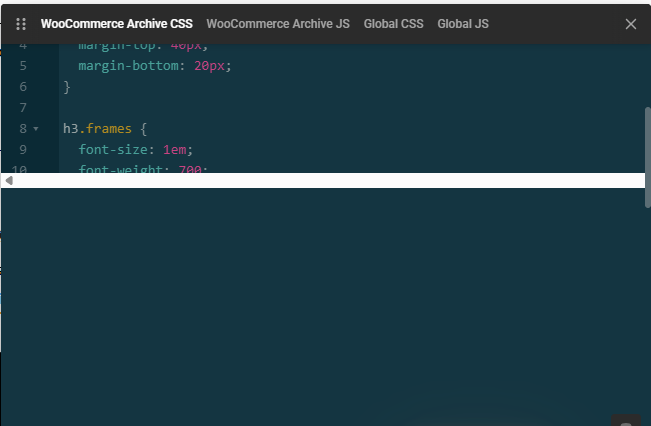
Another niggle I keep coming up against is when opening the code editor or dev tools - usually the first time I do so after opening a page, the pop-up screen usually has a bar across the middle. To get rid of it, the tool has to be closed and be reopened and it then behaves normally. This is present on all sites I work on (60+).

image

Hello @whitemedia,

I checked the layout on my end; it seems that the builder is working fine on my end. It might be an issue with browser cache or any browser extension that might be causing the issue. I have tested it on the Google Chrome browser version 150.0.7871.182. If the issue still persists, please let us know the browser and its version.

Thanks

I am sorry, I disagree. I have:

  • Cleared all browser caches (Chrome, Edge, Firefox)
  • Cleared Cornerstone cache
  • Used an ingognito session in all browsers
  • Done all of the above on two other computers
  • Done the above on at least six different websites in the browsers on different computers

In all cases, the moment a single change (just one character added or removed) is made in the CSS/JS code editor, the preview breaks and forces all content to the edges of the window, evenwhen global container is enabled on a row.

I had meant to post this in the beta forum for @charlie, as I am also beta testing CS 7.9. Somehow I managed to get it into the general support forum.