Issues after updating to Wordpress 5.0

Hi There,

I’m experiencing few issues after updating my theme, wordpress and plugins to the latest versions.

  1. On top of my site I see a piece of code:
    /* Theme Name: Pro Theme URI: http://theme.co/pro/ Author: Themeco Author URI: http://theme.co/ Description: The Most Advanced Website Creator for WordPress. Version: 2.3.8 License: GNU General Public License v2.0 License URI: NaN Text Domain: x */

  2. I can’t access Pro editor from the new gutenberg wordpress editor, I tried all your suggestions from other threads without a success. I tested plugin conflicts, created new pages, played with settings, deleted cache etc.

  3. I’m still experiencing a problem to access my translated pages in pro editor (started before the update).

Please help me figure out what is going on…

Thanks!
Mona
Ill add to that- the translation functionality that was added to the global blocks recently, is not working properly…
After Translating and saving, I cant reach the translation again.
When it worked for a while the translated pages couldn’t pull the translation into the page instead of the english version.

Hey Mona,

We first need to check if the issues you described are caused by the parent theme and not from third party factors such as customization. With that said, please first swtich to the parent theme and check if all the issues you listed persists.

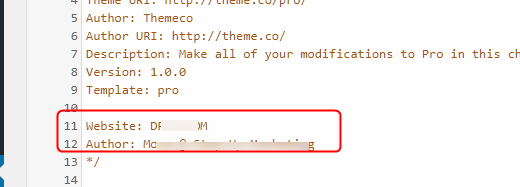
The child theme code outputted in the front-end is likely caused by extra configuration in your style header.

You additionally have some syntax errors.

I know you’ve said you’ve tested for plugin conflicts but I’d like to double check but because this is a live site, we can’t do that because it might affect your live site’s operation. Would you mind copying your site over to a staging server so we could test without the risk of breaking your site?

Once you’ve setup the staging site, please also give us WordPress admin and FTP access to the staging site and FTP access to live site. If it’s ok to do the testing in your live site, we first need permission. Just note that there is a risk that your site might break on top of service interruption to your users.

Regarding the Global Blocks translation, this is a known issue so you currently need to create 1 Global Block for each language to be used when you translate a page.

Thanks.

Hi Christian,

Thanks for your help!

  1. I followed your instructions and resolved the code problem.
  2. The staging environment is ready, I’ll send the details in a private message.

Waiting for your updates…

All Best

Hi Mona,

I have tried to login into your WordPress staging backend, but it seems that your credentials are invalid. See secure note below.

In the meantime, can you try installing the classic editor (https://wordpress.org/plugins/classic-editor/) and see if you can switch back. Classic will be supported until 2021 by WordPress.

Thanks!

The credentials in the secured note
I installed the classic editor, the problem with gutenberg solved but the problem with wpml not resolved.
We tried deleting and creating the translations again and unfortunately its impossible editing the translations with pro after selecting translate independently.
I’ll add another translation issue with cards elements, we created 3 cols with cards and the cards are 100% width in the translated pages.

Thanks for your help

Hi @moanina,

Could you try updating it again? The recent update contains some fixes, but I’m not sure if this is related.

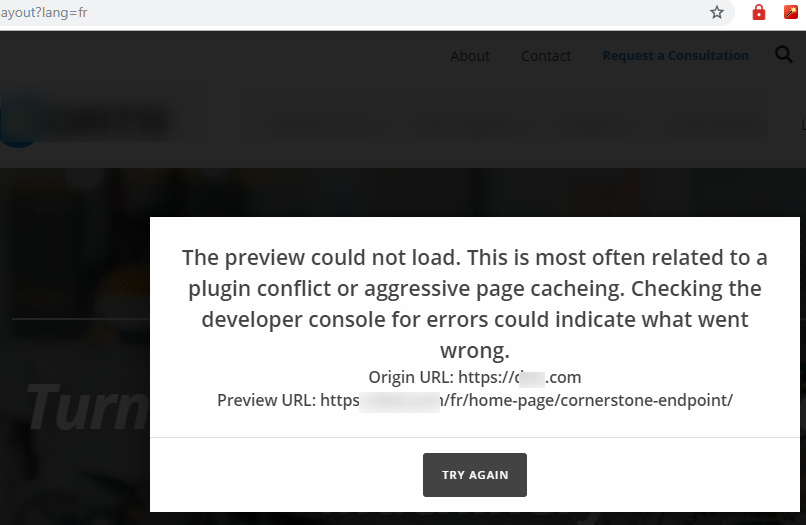
The issue on your site is preview URL, the one being requested is something like fr/home-page/cornerstone-endpoint/ instead of fr/home-page/, it’s a bit weird and it’s my first time seeing it. Let me know and I’ll check it further.

Thanks!

Hi Rad,

Can you be more specific please, update what again?
I created a staging environment for you to do whatever you want.

Thanks!
Mona

Hi Mona,

Sorry, I meant updating the theme and plugins again. Especially your theme, it’s still on Pro 2.3.8.

Thanks!

Hi Rad,

I updated the theme, I would love to know what the fixes are because we are going to create the pages again, hopefully the last time.

I would like to hear a solution for the card element too.

Thanks!
Mona

Hey Mona,

You can check out what issues has been fixed in the recent update release with out changelog here:
https://theme.co/changelog/#theme-pro-2-4-1-theme-x-6-4-1-cornerstone-3-4-1

By the way, please make sure that the theme and all your plugins is up to date. Most of the time, out dated theme or plugins will create an issue or prevent Cornerstone editor from loading.

Hope this helps. Please let us know how it goes.

Hi RueNel,

Ok, I’m losing my patience here.
Every time I submit a support ticket, someone new enters the conversation and gives me different advice.
Each time, I do what is asked, it doesn’t work, and nobody has actually helped me. I strongly request contact from a manager or similar figure immediately. We use your template for all of our clients and at present recommend it as the best option. However if my support tickets are not addressed in a more efficient fashion I will need to seek out a new solution.

Thanks!
Mona

Hi Mona,

Sorry to about that, but we only recommend updating them since you also updated your Wordpress to prevent incompatibilities. It may not fix the issue, but it could narrow down the troubleshooting process. And we’ll still recommend it if we still see older versions, and it’s a must since your Wordpress is in the latest version which older plugins and themes may not work properly.

I still can confirm the issue and been troubleshooting it. I’ll continue checking, thanks!

Thanks!

Hi Rad,

All plugins updated. I’m expecting to get a real solution for my issues.
I created a staging environment and you can do whatever you want ti figure out what the problems are.

Thanks!
Mona

Hi Mona,

Thanks but as of now, we’re not sure what’s causing this and it works fine on my installation. We’ll continue checking.

Thanks!

Hi Rad,

Please look into the cards element problem, on translated pages the cards element is 100% of the site width instead of 1/2 or 1/3 column.

If you cant help me, at least try to help me with this bug.

Thanks!
Mona

Hey Mona,

I’m sorry but we couldn’t check your FR page because the builder could not be loaded.

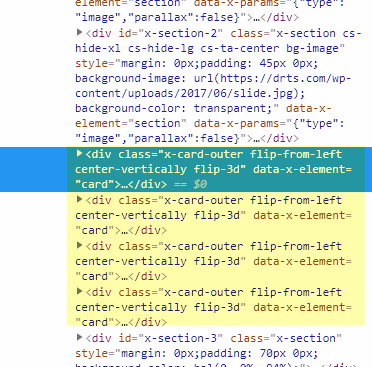
Just looking at the front-end, it is weird that the cards are not wrapped even in a section. Like Rad, it’s my first time to see such an issue so we have asked for help from our development team.

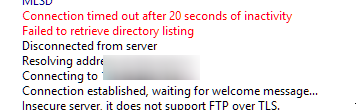
I’m sorry if we could not provide a specific time as to when this will be checked but I’d recommend that you keep the live and staging access open. Please also check the FTP credentials of your staging site because I get a timeout issue.

If you can, I’d also recommend that you create another test site with fresh WordPress install and only install Pro and WPML. This way, we reduce the variables to a few areas only.

Thank you.

Hi @moanina,

As an addition to Christian’s recommendation, can you first test it again? The builder seems now loading okay in the staging. I did some changes in the configuration and I’m not sure which one made it works because it still works after removing them. Could be just specific to your host environment or permalink.

You can then move your staging back to live.

Thanks!

Hi Rad,

I see that the latest theme updates solved some of the problems I mentioned above. But still the cards layout problem persists. On the staging site the cards problem resolved, I guess related to your configurations.
Please, I would love to know what the configurations are in order to apply them to the live site.

Thanks!
Mona

Hi Mona,

I have added some configuration which I removed again, weird part is after removing them, it still works.

But one thing I noticed in comparison is the memory limit. Please try checking your site’s wp-config.php (staging and live) and compare and implement the missing lines and place it exactly how it’s placed from staging.

define('WP_MEMORY_LIMIT', '512M');

I’m not sure how it was implemented in your live site, I assume it’s in wp-config.php, else, it will be on php.ini.

Thanks!