Image should cover 100% slide height

Hello,

I am trying to implement a slider within a column such that each slide takes up the full height of the surrounding column.

Test setup:
Row with two columns (50/50)
Both columns set to 75vh
Left column: single image set to cover, 100% height → image gets 75vh → works as desired
Right column: slider with slide with image, set to cover, 100% height → works not the same way, image will not fillup the slide.

Goal:
Each slide should fill the full height of the containing column (75vh).

Problem:
Inside the slider, the image does not take up the full height of the slides. Regardless of whether I insert it as a background or as an image element with 100% height, it ends up with a smaller height - the source of which is unclear to me. I cannot determine where this height is coming from (see screenshot).

What I have tried:
As this is similar to the issue described here: Slider (Stacked) "Cover" not working? - I tried:

  • setting as background image with 100% height: no effect. don’t understand, where the used height is coming from.
  • setting the slide/image height to 100vh: does not solve my problem - as the slide should not exceed the 75vh height of the containing column.
  • “Filling up” the slide using 100% bottom padding. While the image displays correctly covering, the slide becomes taller than the 75vh of the surrounding column. it seems to take the images height as 100% - not the columns height.

Question:
Which setting or container determines the height of the slide or the image, and how can I ensure that each slide adopts the exact height of its surrounding column—even if it has no content or padding?

Many thanks!

Hello @Daryl_Shaw,

Thanks for writing to us.

To help you with your concerns, please share your details in a secure note. Please provide the following details

  • WordPress Login URL
  • Admin-level username and password
  • Exact page URL

You can find the Secure Note button at the bottom of your posts

Thanks

Thanks, done.

Hello @Daryl_Shaw,

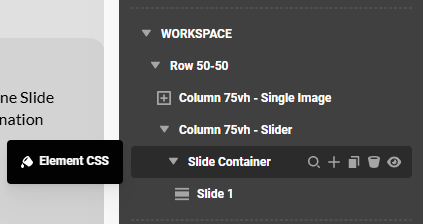
You will need to set the height of the Slider Container explicitly. Insert an inline element CSS:

$el {
  height: 100%;
  min-height: 100%;
}

Best Regards.

Ok, that is working.
Could you kindly explain why that isn’t possible in this case by simply setting the height to 100% for the individual slide? In my experience, the height of the entire slider is always determined by the tallest slide; if just one is set to 100% height, the slider would fill the entire container, right? That’s how I would logically expect it to work in this situation.

Hello Daryl,

You are correct. The tallest slide determines the height of the entire slider. At the same time, setting the Slide height to 100% will only work if the Slide Container’s height is explicitly defined. The same goes for the height of the container containing the Slider Container, and so on. This means that if you have set 75vh height for the Column element, the child DIV container up to the slide element must have 100% height.

Hope this makes sense.

Yes, I understand that. But why do I have to use inline CSS instead of achieving it by setting the height of the elements to 100% in cornerstone sidebar?

Hello Daryl,

There is no Height setting in the Slider Container.

The percentage % unit gets the reference value from the explicit value of the parent element. In this case, the Column element. We have to set 100% height for the slide and slide container since we will be referencing the Column height of 75vh.
image

Using inline CSS is the only way to do that for the Slider Container element.

Hope this helps.

Ok thanks!

You’re welcome.