Hello,
I am trying to implement a slider within a column such that each slide takes up the full height of the surrounding column.
Test setup:
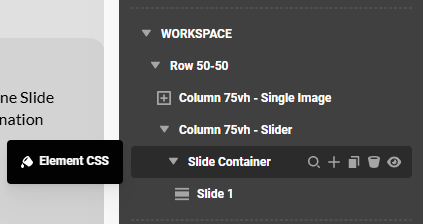
Row with two columns (50/50)
Both columns set to 75vh
Left column: single image set to cover, 100% height → image gets 75vh → works as desired
Right column: slider with slide with image, set to cover, 100% height → works not the same way, image will not fillup the slide.
Goal:
Each slide should fill the full height of the containing column (75vh).
Problem:
Inside the slider, the image does not take up the full height of the slides. Regardless of whether I insert it as a background or as an image element with 100% height, it ends up with a smaller height - the source of which is unclear to me. I cannot determine where this height is coming from (see screenshot).

What I have tried:
As this is similar to the issue described here: Slider (Stacked) "Cover" not working? - I tried:
- setting as background image with 100% height: no effect. don’t understand, where the used height is coming from.
- setting the slide/image height to 100vh: does not solve my problem - as the slide should not exceed the 75vh height of the containing column.
- “Filling up” the slide using 100% bottom padding. While the image displays correctly covering, the slide becomes taller than the 75vh of the surrounding column. it seems to take the images height as 100% - not the columns height.

Question:
Which setting or container determines the height of the slide or the image, and how can I ensure that each slide adopts the exact height of its surrounding column—even if it has no content or padding?
Many thanks!